Steam Manifest GitHub: 위험한 다운로드 없이 올바른 파일 찾기
GitHub에서 Steam manifest, Lua 스크립트, AppID, appmanifest 데이터, SteamTools용 패키지를 찾는 사용자를 위한 실용 가이드입니다.

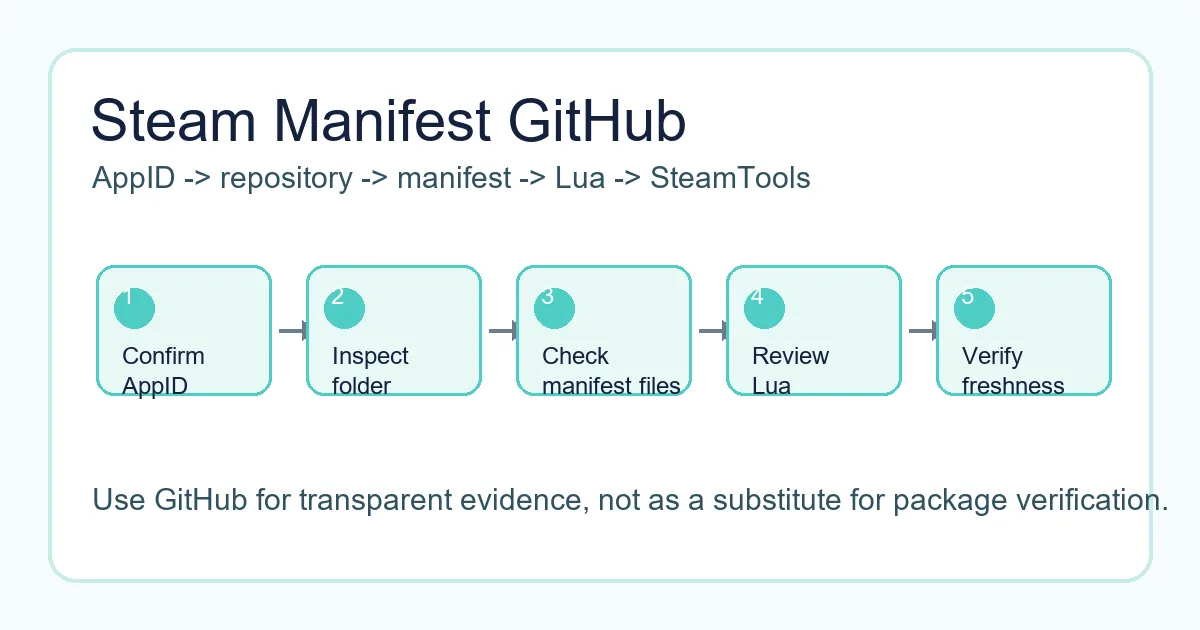
안전한 GitHub 워크플로는 SteamTools 가져오기 전에 AppID 폴더, manifest, Lua, 메타데이터, 업데이트 날짜를 확인합니다.
If you search for "steam manifest github", you are probably trying to find a repository that contains Steam manifest files, Lua scripts, AppIDs, depot data, or a package that can be used with SteamTools. GitHub often appears in those searches because repositories are easy to browse, easy to update, and easier to inspect than anonymous download mirrors.
That transparency is helpful, but it does not make every repository safe or current. A repository can be outdated, incomplete, copied from another source, or mixed with files that do not belong to the AppID you need. The page title may mention Steam manifest while the folder contains only partial metadata or stale Lua files.
This guide explains how Steam manifest GitHub repositories are usually organized, what a complete package should include, how appmanifest files differ from depot manifests, and when it is faster to use a manifest finder instead of browsing GitHub manually.
Why GitHub Shows Up for Steam Manifest Searches
GitHub가 검색에 보이는 이유는 많은 커뮤니티 프로젝트가 manifest 폴더, 검색 도구, SteamTools 스크립트, 문서를 공개하기 때문입니다. 다운로드 전에 파일명, 기록, 구조를 볼 수 있다는 장점이 있습니다.
하지만 결과에는 실제 패키지, 소스 코드, 토론 글, 오래된 fork가 섞입니다. GitHub는 증거를 확인하는 곳이지 정확성을 보장하지 않습니다.
좋은 저장소는 AppID, depot ID, manifest, Lua, 날짜, 패키지 목적을 분명히 보여 줍니다. 어떤 게임의 파일인지 알 수 없다면 가져오지 마세요.
Visible file history
Commit dates can help you judge whether a package was touched after a recent game update.
Browsable folders
A clear AppID folder is easier to verify than a password-protected archive or forced installer.
Lua and metadata
Lua, JSON, VDF, and manifest files should describe the same app rather than unrelated packages.
Forks can be stale
A fork may look legitimate but stop receiving updates long before the original source changes.
What a Steam Manifest GitHub Repository Usually Contains
유용한 저장소는 보통 AppID 또는 게임 패키지별로 정리됩니다. 폴더 안에는 depot manifest, Lua, JSON, VDF 또는 key, README, release ZIP이 있을 수 있습니다.
Steam은 depot과 manifest로 콘텐츠 전달을 관리합니다. 커뮤니티 저장소는 SteamTools 워크플로가 기대하는 작은 파일을 모아 둔 것입니다.
아래 표는 폴더를 빠르게 점검하는 기준입니다.
| File or folder | What it usually means | What to verify |
|---|---|---|
| AppID folder | A folder named with the Steam app number | Confirm it matches the Steam store page or SteamDB entry |
| .manifest files | Depot manifest data for one or more depots | Check that the depot IDs make sense for the game or edition |
| .lua file | SteamTools handoff script | Open it as text and confirm it references the same AppID |
| JSON metadata | Package, depot, or source information | Look for readable title, AppID, depot list, and source date |
| VDF or key files | Supporting configuration used by some workflows | Make sure the file belongs to the same app package |
| Release ZIP | Convenience archive of the files | Prefer archives that mirror the visible repository contents |
The Safe Checklist Before Downloading from GitHub
ZIP을 받거나 파일을 복사하기 전에 짧게 확인하세요. 저장소 이름만 빌리고 내용을 바꾼 미러를 피할 수 있습니다.
정체성, 최신성, 범위를 확인합니다. AppID, 게임명, Lua, manifest 폴더가 일치해야 하며, 오래된 패키지는 패치 후 실패할 수 있고 작은 패키지가 실행 파일을 요구해서는 안 됩니다.
-
Confirm the AppID outside the repository
Use the Steam store URL, SteamDB, or the AppID Finder on this site. Do not rely only on a GitHub folder name.
-
Inspect the file list before downloading
A transparent package should show manifest, Lua, JSON, and optional VDF or key files without hiding them behind an installer.
-
Check update timing
Compare repository commit dates or release dates with the game patch window. Old packages can import but fail later.
-
Avoid executable wrappers
Manifest and Lua files are small. A forced .exe, browser extension, or password archive is a separate software trust decision.
-
Use same-language pages when possible
If you move from this guide to a finder or AppID page, use the localized route so instructions and anchors stay consistent.
Practical rule
GitHub is safest when it stays transparent. If you cannot inspect the package before running something, choose a browser-based lookup path instead.
Appmanifest Files vs Steam Depot Manifest Files
manifest라는 단어는 여러 파일을 가리킵니다. appmanifest는 appmanifest_730.acf 같은 로컬 Steam 라이브러리 기록입니다. depot manifest는 콘텐츠 버전 데이터를 설명합니다.
appmanifest Steam GitHub를 찾는다면 완성 패키지보다 예시나 설명이 필요할 수 있습니다. appmanifest는 depot manifest나 Lua를 대신하지 않습니다.
이 차이를 알면 GitHub에서 잘못된 파일을 받는 일을 줄일 수 있습니다.
| Term | Common file example | Use case |
|---|---|---|
| Appmanifest / ACF | appmanifest_1091500.acf | Local Steam library metadata for an installed app |
| Depot manifest | .manifest files in a package folder | Describes depot content versions used by Steam delivery |
| Lua script | 1091500.lua or similar | Maps the package for a SteamTools workflow |
| JSON metadata | app.json, depots.json, package.json | Documents title, AppID, depots, and source context |
A Better Workflow Than Searching Random GitHub Forks
알려진 저장소를 직접 확인해야 할 때 GitHub 탐색은 유용합니다. 단순히 AppID 패키지 존재 여부가 궁금하다면 finder가 더 빠릅니다.
이 사이트의 Steam Manifest Finder는 AppID별 가용성을 확인하고, AppID Finder는 게임명만 알 때 도움이 됩니다.
이 페이지는 GitHub 결과를 해석하고 무엇을 믿을지 정하는 안전 확인 레이어입니다.
| Your situation | Best next page | Why |
|---|---|---|
| You know the AppID and need availability | Steam Manifest Finder | Checks package availability without manual repository browsing |
| You know the game name only | AppID Finder | Reduces demo, DLC, soundtrack, and edition mistakes |
| You want repository safety context | Steam Manifest Hub Guide | Explains hubs, mirrors, and source trust checks |
| You need a full package checklist | SteamTools Manifest Generator Guide | Covers Lua, manifest, JSON, VDF, and import checks |
FAQ
작성자 소개
Sophie Laurent
기술 작가 및 PC 게임 애호가
Sophie Laurent는 Steam 파일 관리, AppID, manifest, SteamTools 워크플로를 다루는 실용 가이드를 씁니다. 흩어진 저장소 용어를 명확한 확인 절차로 정리합니다.
참고 자료
- Steamworks Documentation - Applications and depots - Official background on Steam application and depot structure.
- SteamDB technical blog - Steam download system - Technical explanation of depots, manifests, and Steam content delivery.
- GitHub Docs - About repositories - Primary documentation for repository structure, files, and history.
최종 업데이트: 2026년 6월 4일