Steam Manifest GitHub:危険なダウンロードを避けて正しいファイルを探す方法
GitHub で Steam manifest、Lua、AppID、appmanifest、SteamTools 用パッケージを探す人向けの実用ガイドです。

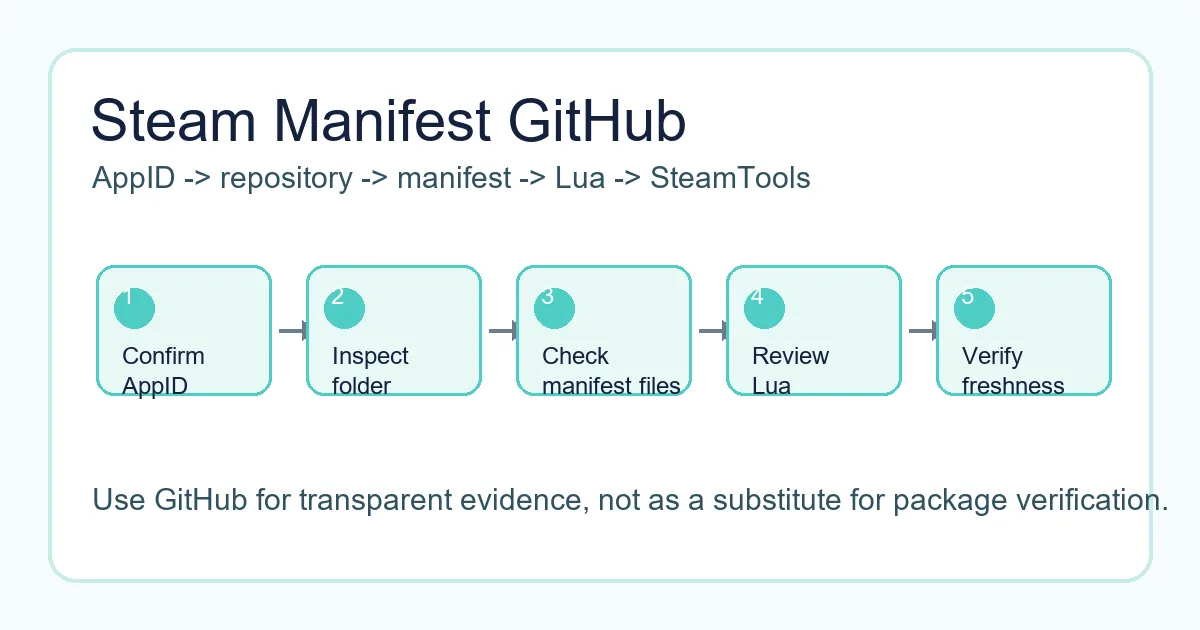
安全な GitHub ワークフローでは、SteamTools に import する前に AppID、manifest、Lua、metadata、更新日を確認します。
If you search for "steam manifest github", you are probably trying to find a repository that contains Steam manifest files, Lua scripts, AppIDs, depot data, or a package that can be used with SteamTools. GitHub often appears in those searches because repositories are easy to browse, easy to update, and easier to inspect than anonymous download mirrors.
That transparency is helpful, but it does not make every repository safe or current. A repository can be outdated, incomplete, copied from another source, or mixed with files that do not belong to the AppID you need. The page title may mention Steam manifest while the folder contains only partial metadata or stale Lua files.
This guide explains how Steam manifest GitHub repositories are usually organized, what a complete package should include, how appmanifest files differ from depot manifests, and when it is faster to use a manifest finder instead of browsing GitHub manually.
Why GitHub Shows Up for Steam Manifest Searches
GitHub が表示されるのは、コミュニティプロジェクトが manifest フォルダ、検索ツール、SteamTools 用 Lua、説明資料を公開しているためです。ファイル名、履歴、構造を確認できる点は利点です。
ただし検索結果には実際のパッケージ、ツールのソースコード、議論ページ、古い fork が混ざります。GitHub は証拠を見る場所であり、正しさの保証ではありません。
有用なリポジトリは AppID、depot ID、manifest、Lua、日付、目的を明確にします。対象ゲームが分からない場合は import しないでください。
Visible file history
Commit dates can help you judge whether a package was touched after a recent game update.
Browsable folders
A clear AppID folder is easier to verify than a password-protected archive or forced installer.
Lua and metadata
Lua, JSON, VDF, and manifest files should describe the same app rather than unrelated packages.
Forks can be stale
A fork may look legitimate but stop receiving updates long before the original source changes.
What a Steam Manifest GitHub Repository Usually Contains
多くの有用なリポジトリは AppID またはゲームパッケージ単位で整理されています。中には depot manifest、Lua、JSON、VDF やキー、README、release ZIP が含まれる場合があります。
Steam は depot と manifest でコンテンツ配信を管理します。コミュニティリポジトリは SteamTools が期待する小さなファイルをまとめているだけです。
以下の表でファイル種別を分けて確認できます。
| File or folder | What it usually means | What to verify |
|---|---|---|
| AppID folder | A folder named with the Steam app number | Confirm it matches the Steam store page or SteamDB entry |
| .manifest files | Depot manifest data for one or more depots | Check that the depot IDs make sense for the game or edition |
| .lua file | SteamTools handoff script | Open it as text and confirm it references the same AppID |
| JSON metadata | Package, depot, or source information | Look for readable title, AppID, depot list, and source date |
| VDF or key files | Supporting configuration used by some workflows | Make sure the file belongs to the same app package |
| Release ZIP | Convenience archive of the files | Prefer archives that mirror the visible repository contents |
The Safe Checklist Before Downloading from GitHub
ZIP を落とす前に短い確認をしてください。名前だけ借りて中身を変えた mirror を避けるためです。
確認するのは同一性、新しさ、範囲です。AppID、タイトル、Lua、manifest フォルダが一致し、最近の patch に対して古すぎず、小さなパッケージが実行ファイルを要求しないことを見ます。
-
Confirm the AppID outside the repository
Use the Steam store URL, SteamDB, or the AppID Finder on this site. Do not rely only on a GitHub folder name.
-
Inspect the file list before downloading
A transparent package should show manifest, Lua, JSON, and optional VDF or key files without hiding them behind an installer.
-
Check update timing
Compare repository commit dates or release dates with the game patch window. Old packages can import but fail later.
-
Avoid executable wrappers
Manifest and Lua files are small. A forced .exe, browser extension, or password archive is a separate software trust decision.
-
Use same-language pages when possible
If you move from this guide to a finder or AppID page, use the localized route so instructions and anchors stay consistent.
Practical rule
GitHub is safest when it stays transparent. If you cannot inspect the package before running something, choose a browser-based lookup path instead.
Appmanifest Files vs Steam Depot Manifest Files
manifest という言葉は複数の意味で使われます。appmanifest は appmanifest_730.acf のようなローカル Steam ライブラリ記録です。depot manifest はコンテンツのバージョンデータです。
appmanifest Steam GitHub と検索している場合、必要なのはサンプルや説明であり、SteamTools 用パッケージではないことがあります。appmanifest は depot manifest や Lua の代わりにはなりません。
この違いを理解すると、GitHub で違う資産を落とす失敗を避けられます。
| Term | Common file example | Use case |
|---|---|---|
| Appmanifest / ACF | appmanifest_1091500.acf | Local Steam library metadata for an installed app |
| Depot manifest | .manifest files in a package folder | Describes depot content versions used by Steam delivery |
| Lua script | 1091500.lua or similar | Maps the package for a SteamTools workflow |
| JSON metadata | app.json, depots.json, package.json | Documents title, AppID, depots, and source context |
A Better Workflow Than Searching Random GitHub Forks
既知のリポジトリを確認したい場合、手作業の GitHub 閲覧は有用です。ただし 1 つの AppID にパッケージがあるか知りたいだけなら finder が速いです。
このサイトでは Steam Manifest Finder が AppID ごとの有無を確認し、AppID Finder はゲーム名しか分からない場合に役立ちます。
このページは GitHub 結果を読むための安全確認レイヤーとして使ってください。
| Your situation | Best next page | Why |
|---|---|---|
| You know the AppID and need availability | Steam Manifest Finder | Checks package availability without manual repository browsing |
| You know the game name only | AppID Finder | Reduces demo, DLC, soundtrack, and edition mistakes |
| You want repository safety context | Steam Manifest Hub Guide | Explains hubs, mirrors, and source trust checks |
| You need a full package checklist | SteamTools Manifest Generator Guide | Covers Lua, manifest, JSON, VDF, and import checks |
FAQ
著者について
Sophie Laurent
テクニカルライター / PC ゲーム愛好家
Sophie Laurent は Steam ファイル管理、AppID、manifest、SteamTools ワークフローを分かりやすく整理するライターです。散らばったリポジトリ用語を実行しやすい確認手順に変えます。
参考資料
- Steamworks Documentation - Applications and depots - Official background on Steam application and depot structure.
- SteamDB technical blog - Steam download system - Technical explanation of depots, manifests, and Steam content delivery.
- GitHub Docs - About repositories - Primary documentation for repository structure, files, and history.
最終更新: 2026年6月4日