Steam Manifest GitHub: How to Find the Right Files Without Risky Downloads
A practical guide for users who search GitHub for Steam manifest files, Lua scripts, AppIDs, appmanifest data, and SteamTools-ready packages.

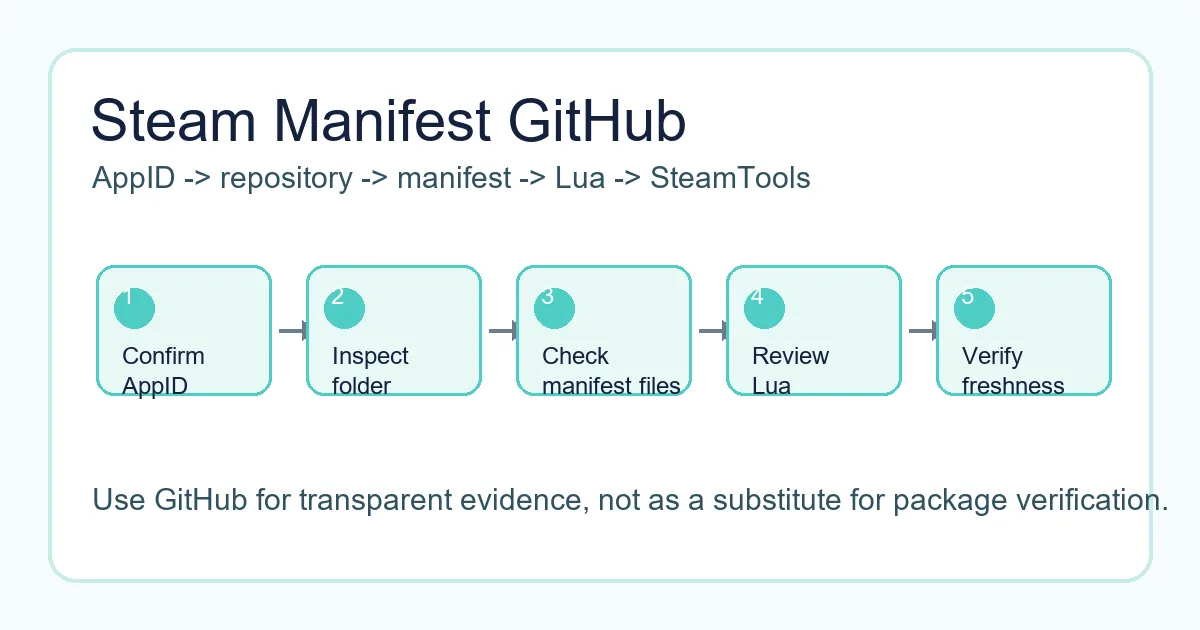
A safer GitHub workflow checks the AppID folder, manifest files, Lua script, metadata, and update date before any SteamTools import.
Table of Contents
If you search for "steam manifest github", you are probably trying to find a repository that contains Steam manifest files, Lua scripts, AppIDs, depot data, or a package that can be used with SteamTools. GitHub often appears in those searches because repositories are easy to browse, easy to update, and easier to inspect than anonymous download mirrors.
That transparency is helpful, but it does not make every repository safe or current. A repository can be outdated, incomplete, copied from another source, or mixed with files that do not belong to the AppID you need. The page title may mention Steam manifest while the folder contains only partial metadata or stale Lua files.
This guide explains how Steam manifest GitHub repositories are usually organized, what a complete package should include, how appmanifest files differ from depot manifests, and when it is faster to use a manifest finder instead of browsing GitHub manually.
Why GitHub Shows Up for Steam Manifest Searches
GitHub ranks for this query because many community projects publish manifest-related folders, lookup tools, SteamTools scripts, and documentation there. Searchers like GitHub because they can see file names, commit history, and repository structure before downloading anything.
The risk is that search results mix very different intents. One result may be a manifest package archive, another may be a tool source code repository, another may be a discussion page, and another may be an old fork with no current files. Treat GitHub as a place to inspect evidence, not as proof that the files are correct.
A useful repository makes the AppID, depot IDs, manifest files, Lua file, source date, and package purpose clear. If you cannot tell what game or version the files belong to, do not import them into SteamTools.
Visible file history
Commit dates can help you judge whether a package was touched after a recent game update.
Browsable folders
A clear AppID folder is easier to verify than a password-protected archive or forced installer.
Lua and metadata
Lua, JSON, VDF, and manifest files should describe the same app rather than unrelated packages.
Forks can be stale
A fork may look legitimate but stop receiving updates long before the original source changes.
What a Steam Manifest GitHub Repository Usually Contains
Most useful repositories are organized by AppID or by game package. Inside a folder, you may see depot manifest files, a Lua script, JSON metadata, VDF or key data, README notes, and sometimes release archives. The exact layout varies, so the important check is whether the pieces point to the same Steam app.
Steam itself uses depots and manifests to describe content delivery. Community repositories do not replace that system. They collect the small files and scripts that a SteamTools workflow expects, often so users do not have to search each depot manually.
The table below separates common file types so you can inspect a folder quickly before downloading or importing anything.
| File or folder | What it usually means | What to verify |
|---|---|---|
| AppID folder | A folder named with the Steam app number | Confirm it matches the Steam store page or SteamDB entry |
| .manifest files | Depot manifest data for one or more depots | Check that the depot IDs make sense for the game or edition |
| .lua file | SteamTools handoff script | Open it as text and confirm it references the same AppID |
| JSON metadata | Package, depot, or source information | Look for readable title, AppID, depot list, and source date |
| VDF or key files | Supporting configuration used by some workflows | Make sure the file belongs to the same app package |
| Release ZIP | Convenience archive of the files | Prefer archives that mirror the visible repository contents |
The Safe Checklist Before Downloading from GitHub
Before you download a ZIP or copy files from GitHub, run a short verification pass. It takes less time than debugging a bad import later, and it helps you avoid unsafe mirrors that reuse repository names without preserving the original files.
The first check is identity: AppID, game title, Lua file, and manifest folder should agree. The second check is freshness: if the game updated recently, old commits may be stale. The third check is scope: a manifest package should not require unrelated executables, browser extensions, or installers.
-
Confirm the AppID outside the repository
Use the Steam store URL, SteamDB, or the AppID Finder on this site. Do not rely only on a GitHub folder name.
-
Inspect the file list before downloading
A transparent package should show manifest, Lua, JSON, and optional VDF or key files without hiding them behind an installer.
-
Check update timing
Compare repository commit dates or release dates with the game patch window. Old packages can import but fail later.
-
Avoid executable wrappers
Manifest and Lua files are small. A forced .exe, browser extension, or password archive is a separate software trust decision.
-
Use same-language pages when possible
If you move from this guide to a finder or AppID page, use the localized route so instructions and anchors stay consistent.
Practical rule
GitHub is safest when it stays transparent. If you cannot inspect the package before running something, choose a browser-based lookup path instead.
Appmanifest Files vs Steam Depot Manifest Files
The word manifest is confusing because Steam users often mean different files. An appmanifest file is the local Steam library record for an installed app, often named like appmanifest_730.acf. A depot manifest is content version data used by Steam delivery. A SteamTools package may also include Lua and metadata that refer to those depot manifests.
If your search intent is appmanifest Steam GitHub, you may be looking for examples or explanations rather than a ready package. Do not assume an appmanifest example can replace depot manifests or Lua files. They serve different parts of the workflow.
Use this distinction to avoid downloading the wrong asset from GitHub. A repository that only explains appmanifest ACF files will not necessarily contain SteamTools-ready manifest packages.
| Term | Common file example | Use case |
|---|---|---|
| Appmanifest / ACF | appmanifest_1091500.acf | Local Steam library metadata for an installed app |
| Depot manifest | .manifest files in a package folder | Describes depot content versions used by Steam delivery |
| Lua script | 1091500.lua or similar | Maps the package for a SteamTools workflow |
| JSON metadata | app.json, depots.json, package.json | Documents title, AppID, depots, and source context |
A Better Workflow Than Searching Random GitHub Forks
Manual GitHub browsing is useful when you need transparency or want to inspect a known repository. It is not the fastest path when you only need to know whether a package exists for one AppID. For that task, use a manifest finder first, then inspect source details if a package is available.
On this site, the Steam Manifest Finder is the quickest availability check by AppID, while the AppID Finder helps when you only know the game name. The Steam Manifest Hub guide explains repository and mirror terminology, and the SteamTools Manifest Generator guide explains the complete package checklist.
This page should be treated as a safety and interpretation layer for GitHub results. It helps you decide what to trust, what to skip, and which local tool page to use next.
| Your situation | Best next page | Why |
|---|---|---|
| You know the AppID and need availability | Steam Manifest Finder | Checks package availability without manual repository browsing |
| You know the game name only | AppID Finder | Reduces demo, DLC, soundtrack, and edition mistakes |
| You want repository safety context | Steam Manifest Hub Guide | Explains hubs, mirrors, and source trust checks |
| You need a full package checklist | SteamTools Manifest Generator Guide | Covers Lua, manifest, JSON, VDF, and import checks |
FAQ
About the author
Sophie Laurent
Tech Writer & PC Gaming Enthusiast
Sophie Laurent writes practical guides about Steam file management, AppIDs, manifests, and SteamTools workflows. Her work focuses on turning scattered repository terms into clear, repeatable checks for everyday PC gamers.
References and further reading
- Steamworks Documentation - Applications and depots - Official background on Steam application and depot structure.
- SteamDB technical blog - Steam download system - Technical explanation of depots, manifests, and Steam content delivery.
- GitHub Docs - About repositories - Primary documentation for repository structure, files, and history.
Last updated: June 4, 2026