Steam Manifest Finder
Find Steam manifests by AppID and check availability before you download.
Tip: If you do not know the AppID, use our AppID Finder first.
What This Steam Manifest Finder Helps You Do
The page is built for users who want a fast answer first, then just enough context to move to the next step.
Check Manifest Availability
Enter a Steam AppID and quickly see whether a public manifest package is currently available from the supported source.
Open the Package Faster
When a package is found, you get a direct handoff to the current package URL instead of browsing a repository manually.
Understand the Right Identifiers
The page explains how AppID, DepotID, and ManifestID fit together so the lookup result makes sense.
Stay Focused on SteamTools Workflows
The content is tailored to the common workflow: find the AppID, check the manifest, then continue with the files you need.
What a Steam Manifest Finder Actually Checks
A Steam manifest finder is best understood as a lookup layer, not a promise that every game or every old build will always be available.
A Steam manifest finder helps you start with the identifier most people already understand: the AppID. From there, it checks whether a supported public manifest package exists for that game. This saves you from manually browsing repositories, guessing branch names, or opening SteamDB pages just to confirm whether a package is there.
That distinction matters. A manifest finder is not the same thing as Steam itself generating a brand-new manifest for you. It is also not the same thing as the local appmanifest files stored in a Steam library folder. In this context, the finder is helping you locate a public package tied to Steam depot manifest data and the surrounding files users typically expect in a SteamTools workflow.
This page is designed around the highest-intent action first: answer the question, 'Is there a manifest package for this AppID right now?' Once that answer is clear, the surrounding sections explain why the answer might be yes, no, or different from what you saw in an older guide.
AppID, DepotID, and ManifestID Explained
These three identifiers are the core of any Steam manifest finder workflow.
AppID
The AppID is the starting point for a Steam manifest finder.
- Every Steam game or application has its own AppID.
- You usually find it in the Steam Store URL or on SteamDB.
- This page asks for AppID first because that is the most user-friendly lookup key.
If the AppID is wrong, every later step breaks. That is why this page links directly to the AppID Finder.
DepotID
A single AppID can contain multiple depots.
- Depots split game content into separate units such as base files, language packs, or DLC data.
- A manifest finder often needs to resolve more than one depot behind the scenes.
- That is why one game can have several related manifest records instead of one simple file.
For most users, DepotID is background detail, but it explains why Steam manifest data can look more complex than expected.
ManifestID
ManifestID identifies a specific depot snapshot.
- Each manifest ID points to a particular version of a depot.
- When a game updates, its manifest IDs can change.
- A finder page usually focuses on availability first instead of forcing users to browse raw manifest history.
This is why a manifest package may disappear, change, or fail to match an older workflow after a game patch.
How to Use This Steam Manifest Finder
The fastest path is simple: get the right AppID, run the lookup, then move to the package or the next supporting page.
Find the correct AppID
Use the Steam Store URL, SteamDB, or our AppID Finder to make sure you are searching with the right game identifier.
Check the manifest package
Enter the AppID in the tool above. The finder checks whether a supported public package is available right now.
Open the package result
If a package is found, use the result link to open the current source package directly.
Continue your workflow
If you still need context, use the How It Works page or the AHD guide before moving into the rest of your SteamTools setup.
Why a Manifest May Not Be Found
A not-found result does not always mean the game is invalid. It often means the public source does not currently expose a package for that AppID.
Wrong AppID
The most common issue is a mismatched AppID. Deluxe editions, soundtracks, demos, and DLC can all have different IDs.
Recent Update
A game patch can change manifests faster than a public source is updated, so a package may not be available immediately.
Source Coverage Gap
Some games, regional editions, or less common apps may not be covered by the current public source yet.
Branch or Access Limits
Some manifest history depends on branch access, ownership checks, or source-specific rules, so public availability is not guaranteed.
Steam Lua Manifest Searches and Next Steps
Use the finder as a fast availability check, then move to the generator or AppID support page when needed.
Many users search for terms like Steam manifest Lua, Lua manifest Steam, or SteamTools manifest generator when they actually need the same first answer: whether a package exists for the AppID they have. This page keeps that lookup simple and routes you to the right next step.
If the package exists, continue to the generator workflow with the same AppID. If it does not, confirm the AppID and game edition before assuming the source is missing the title.
A finder result should be treated as an availability signal, not a guarantee that every depot, branch, or old manifest snapshot is present. When a result is found, keep the AppID and package source consistent before moving to a generator or downloader.
Quick Reference Before You Search
If you are new to manifest lookups, this summary helps set expectations before you run the tool.
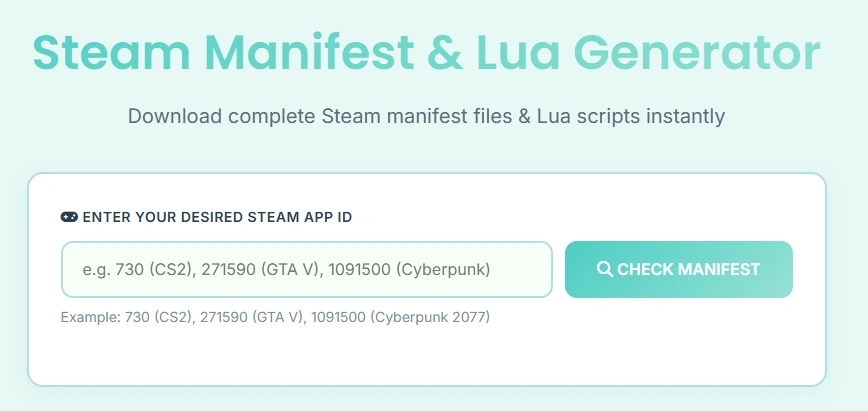
A Steam manifest finder works best when you treat it as a fast availability check tied to AppID. The image below uses the site’s existing manifest workflow UI because the finder belongs in the same family of tasks: identify the game, check the package, then move into the rest of the files and setup steps.
- Steam manifest lookup starts with AppID, not with the game name alone.
- One AppID can map to multiple depots and multiple manifest snapshots over time.
- A public manifest package depends on source coverage and update timing.
- If the result is not found, confirm the AppID before assuming the game is unsupported.
Steam Manifest Finder FAQ
Short answers to the questions users ask most before and after a manifest lookup.
What is a Steam manifest finder?
A Steam manifest finder is a tool that helps you look up whether a public manifest package is available for a Steam AppID. It focuses on finding supported manifest-related files faster, rather than making you browse raw repositories manually.
Why does this page ask for AppID first?
AppID is the simplest stable identifier for a Steam game or application. Once the AppID is known, a finder can work outward to the related depot and manifest data. If you need help, use our AppID Finder.
Is a Steam appmanifest file the same as a depot manifest?
No. They are often confused, but they are not the same thing. This page is about depot manifest-related package lookup, not the local appmanifest_*.acf files stored in a Steam library folder.
Why does the finder say manifest not found?
The AppID may be wrong, the game may have updated recently, the current public source may not cover that title yet, or the relevant data may depend on branch or access conditions.
Can one AppID have multiple manifests?
Yes. One AppID can include multiple depots, and each depot can have multiple manifest snapshots over time. That is why Steam manifest data is versioned and sometimes more complex than users expect.
What should I do after I find a package?
Open the package, then continue with your normal workflow. If you need more context, visit our How It Works guide or the AHD Manifest Finder guide.
Is this a Steam Lua manifest finder?
It can help with Steam Lua manifest searches by checking whether a package exists for the AppID first. If you need the Lua and manifest files together, use the Manifest and Lua Generator after the finder confirms the AppID path.