Steam Lua Generator: How to Check Lua, Manifest, and AppID Files
Use this practical guide to understand what a Steam Lua package should contain, where the generator fits, and how to avoid mismatched AppID, depot manifest, and key files before a SteamTools import.

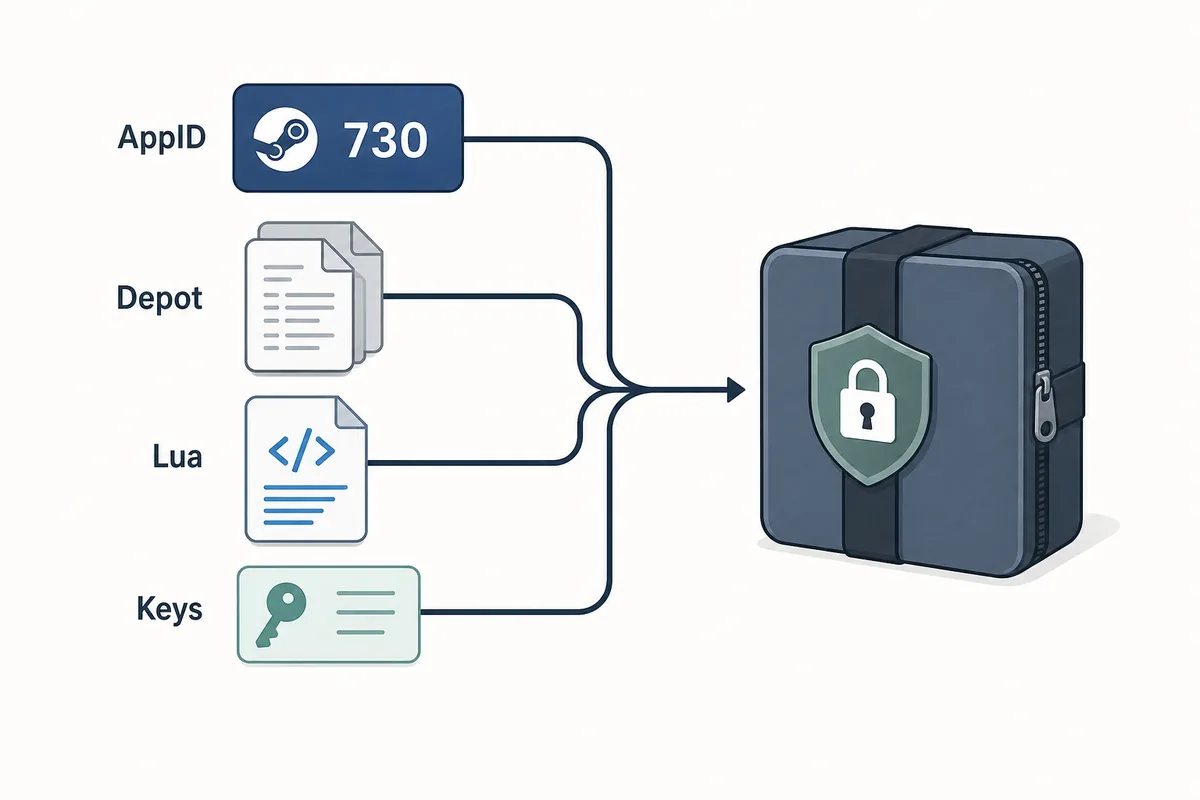
A useful Steam Lua generator keeps the AppID, depot manifest files, Lua script, metadata, and keys in one aligned package.
Table of Contents
A Steam Lua generator is useful when it gives you a Lua script that matches the exact Steam AppID and manifest files you plan to use. The phrase is often used loosely, but the package should not be loose: the AppID, depot manifests, JSON metadata, Lua file, and VDF or key data all need to point to the same game build.
If you only need to download files, use the main Manifest & Lua Generator on this site. This guide exists for the step before and after that action: deciding whether you have the right AppID, checking that the Lua file belongs with the manifest files, and understanding why stale packages fail after updates.
Think of the generator as a packaging shortcut, not as a safety check. A good workflow still starts with AppID confirmation and ends with a quick inspection before anything is imported into SteamTools.
What Does a Steam Lua Generator Create?
A Steam Lua generator should prepare the small text-based files that a SteamTools-style workflow expects. The Lua file is usually the instruction layer, while manifest files describe depot versions. JSON metadata helps you see the game name, AppID, depot list, and package source, and VDF or key files may be needed for a complete handoff.
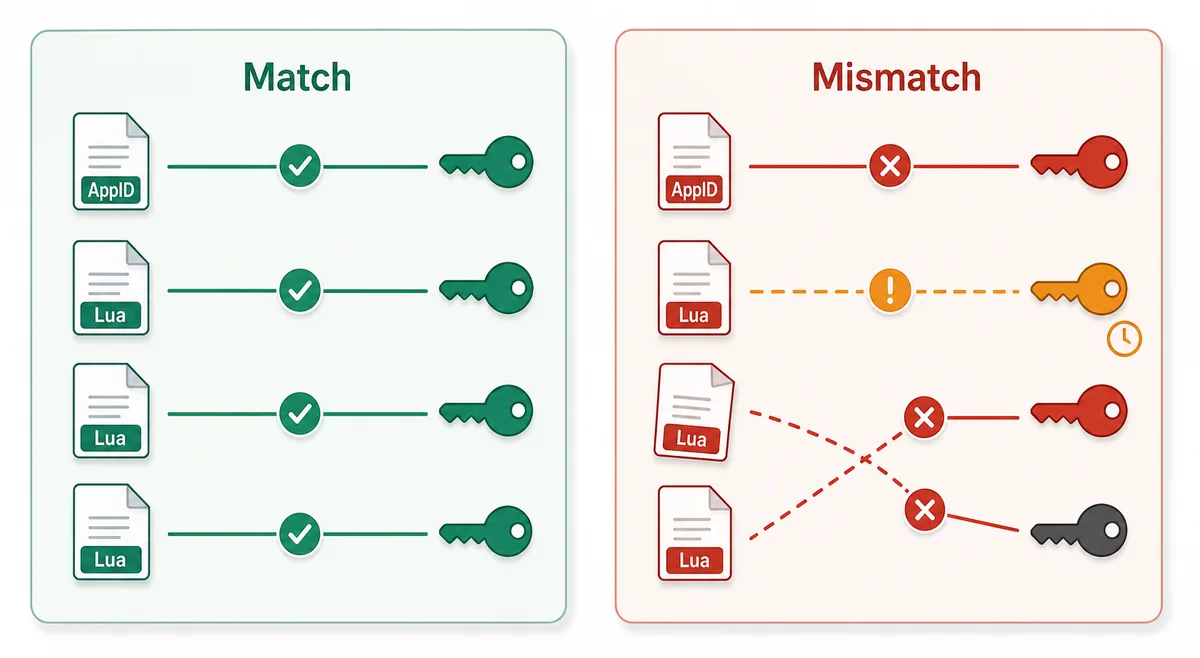
The important point is alignment. A Lua file from one AppID should not be mixed with manifest files from another source just because the game names look similar. Steam entries can include demos, test apps, soundtracks, DLC, regional packages, and old builds, so the number matters more than the title.
Lua script
Connects the package to the SteamTools import flow and should name the same AppID.
Manifest files
Describe depot build versions and must be fresh enough for the current game state.
JSON metadata
Lets you verify title, AppID, depot list, and package source before import.
VDF and keys
Support package completion when the workflow requires key or VDF data.
Lua File vs Manifest File: Know the Boundary
Searchers often type Lua manifest generator as if Lua and manifest were the same file. They are not. The manifest is depot version data. The Lua script is the mapping or instruction file used by the target tool. When a package fails, the problem is often not that one file type is missing; it is that the files do not agree with each other.
Use the table below to decide what you are actually checking. This keeps the guide from competing with the homepage generator while still helping users who are stuck between raw files, GitHub folders, and SteamTools import steps.
| File or data | What it does | What to verify |
|---|---|---|
| AppID | Identifies the exact Steam app, edition, demo, or DLC entry | The number matches the store, SteamDB, or your intended package |
| Depot manifest | Points to depot content versions for a build | The depot belongs to the same app and is not stale after an update |
| Lua file | Maps package data for a SteamTools-style import | The AppID inside or near the Lua package matches the manifest set |
| JSON metadata | Summarizes title, depots, and source context | The package description agrees with the files |
| VDF/key data | Provides supporting package data when needed | Missing or mismatched keys are not hidden by a wrapper |
Safe Workflow: From AppID to Lua Import
Start with the AppID, not with a file name from a forum or mirror. After the AppID is confirmed, check whether a package exists, generate or download it, then inspect the file list. This order prevents most wrong-edition and stale-package mistakes.
A clean package should be inspectable without running an executable. Manifest and Lua packages are usually small text or data files, so a forced installer, browser extension, password archive, or hidden file list is a warning sign.
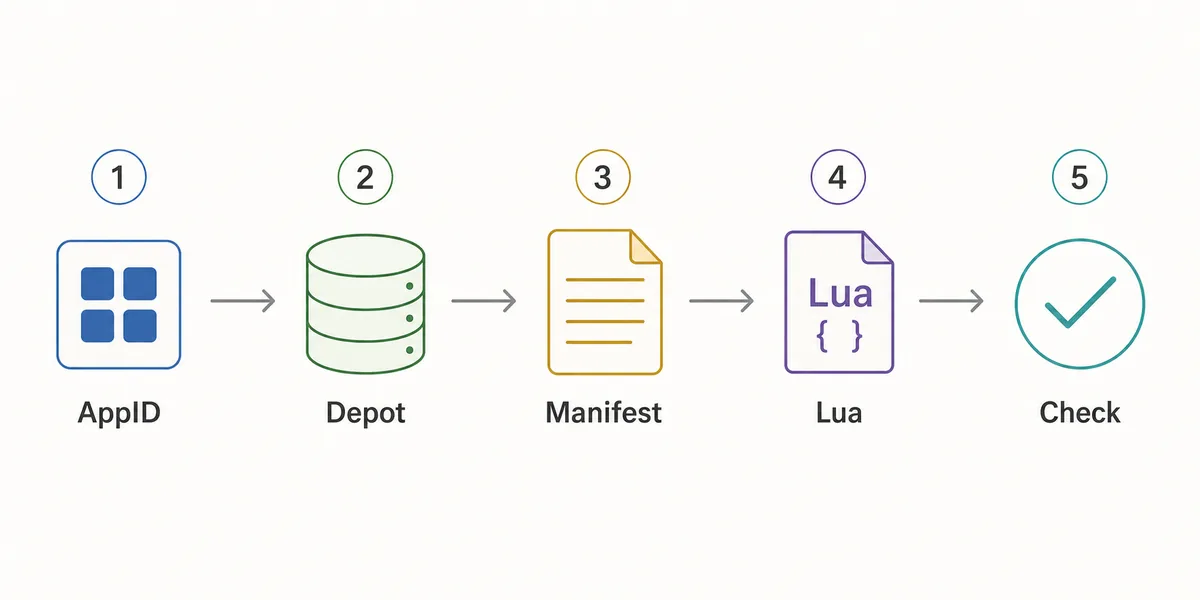
- Confirm the AppID
Use the Steam store URL, SteamDB, or the AppID Finder before you generate anything.
- Check package availability
Use Steam Manifest Finder when you want to know whether a package exists before download.
- Generate the package
Use the main generator when you already know the AppID and need manifest, Lua, JSON, and key files together.
- Inspect the file list
Look for matching AppID references, .manifest files, a .lua file, readable metadata, and expected VDF or key data.
- Refresh after patches
If a game updated recently, stale manifests can fail even when the Lua file looks correct.
Package Verification Checklist Before Import
Use this checklist before importing a Lua package. It is deliberately simple because the goal is to catch obvious mismatches quickly, not to reverse-engineer every file in a Steam depot.
If any item fails, go back one step: recheck the AppID, use the finder to confirm availability, or regenerate the package after a recent update.
| Check | Pass signal | What to do if it fails |
|---|---|---|
| AppID consistency | Folder, metadata, Lua, and package name point to the same AppID | Use AppID Finder or SteamDB to confirm the correct number |
| Manifest presence | One or more .manifest files are included | Regenerate or use the downloader instead of a partial mirror |
| Lua presence | A readable .lua file is included when SteamTools import is the goal | Do not substitute a Lua file from another package |
| Metadata readability | JSON or notes identify game title and depot context | Avoid packages that hide everything behind an installer |
| Update freshness | Package date is newer than the last relevant game patch | Generate a fresh package before changing SteamTools settings |
| No executable wrapper | Files are visible without running a separate program | Do not run unknown executables for small manifest packages |
Which Page Should You Use?
This site now has several pages because the search intents are different. A Steam Lua generator query usually needs explanation plus a route to the main package tool. A Steam manifest finder query needs availability checking. A SteamDB manifest ID query needs ID interpretation. Keeping those jobs separate avoids cannibalizing the homepage and makes each page more useful.
Use this guide when you need to understand the package. Use the generator when you are ready to create the package.
| Need | Best page | Why |
|---|---|---|
| I know the AppID and want the package | Manifest & Lua Generator | Fastest route to the combined manifest and Lua download |
| I want to know whether files exist first | Steam Manifest Finder | Checks availability before download |
| I only know the game name | AppID Finder | Reduces wrong game, DLC, demo, or soundtrack mistakes |
| I need GitHub or repository context | Steam Manifest GitHub Guide | Explains source and mirror checks |
| I need command-line depot download context | DepotDownloader GitHub Guide | Keeps DepotDownloader workflows separate from SteamTools packages |
Intent boundary
A Steam Lua generator guide should educate and route users. The actual package generation belongs on the main tool page.
FAQ
References and further reading
- Steamworks Documentation - Applications and depots - Official background on how Steam applications and depots are structured.
- SteamDB technical blog - Steam download system - Technical explanation of Steam depots, manifests, and content delivery.
- PCGamingWiki - Steam - Community technical reference for Steam-related files and troubleshooting.
Last updated: July 5, 2026