Steam Lua Generator : verifier Lua, Manifest et AppID
Un guide pratique pour comprendre le contenu d'un paquet Lua Steam, la place du generateur et les controles a faire avant une importation SteamTools.

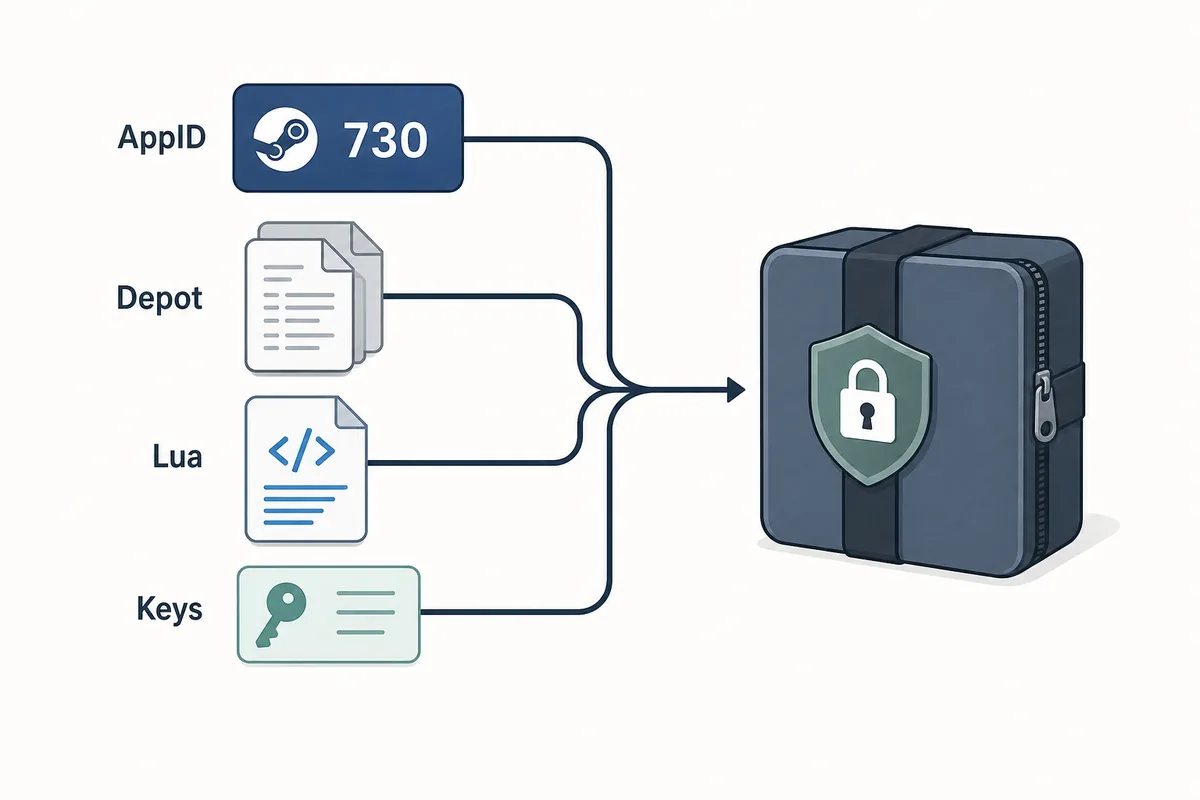
A useful Steam Lua generator keeps the AppID, depot manifest files, Lua script, metadata, and keys in one aligned package.
Sommaire
Un Steam Lua generator est utile lorsqu'il fournit un script Lua correspondant a l'AppID Steam exact et aux fichiers manifest que vous voulez utiliser. Le terme est large, mais le paquet doit rester coherent : AppID, manifests de depot, metadonnees JSON, Lua et donnees VDF ou cles doivent pointer vers le meme build.
Si vous voulez seulement telecharger les fichiers, utilisez le Manifest & Lua Generator principal du site. Cette page sert a l'etape avant et apres : verifier le bon AppID, confirmer que le Lua appartient au bon ensemble de manifests et comprendre pourquoi les anciens paquets echouent apres une mise a jour.
Le generateur accelere le packaging, mais il ne remplace pas une verification. Un bon flux commence par l'AppID et se termine par une inspection rapide avant toute importation dans SteamTools.
Ce que cree un Steam Lua Generator
Un Steam Lua generator doit preparer les petits fichiers texte qu'un workflow de type SteamTools attend. Le fichier Lua sert souvent de couche d'instruction, tandis que les manifests decrivent les versions de depot. Les metadonnees JSON permettent de verifier le titre, l'AppID, la liste des depots et la source du paquet.
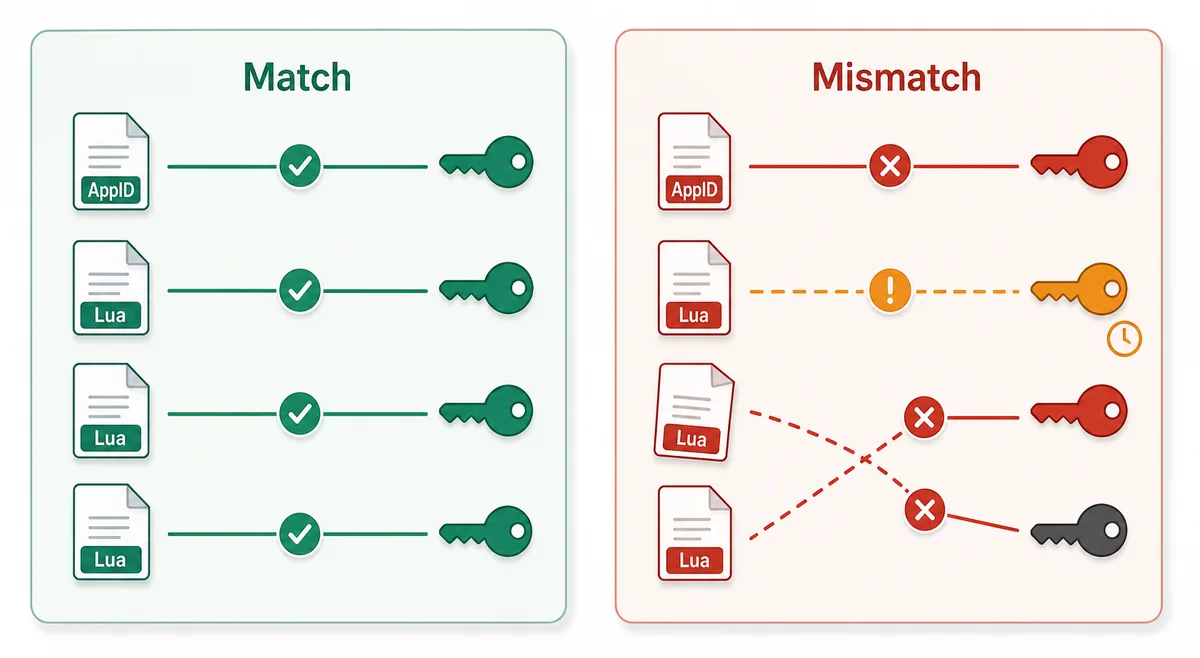
Le point essentiel est l'alignement. Un Lua provenant d'un AppID ne doit pas etre melange a des manifests d'une autre source parce que les noms de jeu se ressemblent. Steam peut separer demos, DLC, bandes-son, builds regionaux et anciennes versions.
Lua script
Connects the package to the SteamTools import flow and should name the same AppID.
Manifest files
Describe depot build versions and must be fresh enough for the current game state.
JSON metadata
Lets you verify title, AppID, depot list, and package source before import.
VDF and keys
Support package completion when the workflow requires key or VDF data.
Fichier Lua ou fichier Manifest
Les recherches Lua manifest generator donnent parfois l'impression que Lua et manifest sont le meme fichier. Ce n'est pas le cas. Le manifest est une donnee de version de depot; le Lua est le fichier de mapping ou d'instruction lu par l'outil cible.
Quand un paquet echoue, le probleme vient souvent d'un desaccord entre les fichiers, pas seulement d'un fichier manquant. Le tableau aide a savoir ce que vous controlez.
| File or data | What it does | What to verify |
|---|---|---|
| AppID | Identifies the exact Steam app, edition, demo, or DLC entry | The number matches the store, SteamDB, or your intended package |
| Depot manifest | Points to depot content versions for a build | The depot belongs to the same app and is not stale after an update |
| Lua file | Maps package data for a SteamTools-style import | The AppID inside or near the Lua package matches the manifest set |
| JSON metadata | Summarizes title, depots, and source context | The package description agrees with the files |
| VDF/key data | Provides supporting package data when needed | Missing or mismatched keys are not hidden by a wrapper |
Workflow sur : de l'AppID a l'import Lua
Commencez par l'AppID, pas par un nom de fichier trouve sur un miroir. Confirmez ensuite l'existence du paquet, genereez ou telechargez-le, puis inspectez la liste des fichiers.
Un paquet sain doit etre lisible sans executable. Comme les manifests et Lua sont de petits fichiers, un installateur force, une extension navigateur ou une archive cachee est un signal de risque.
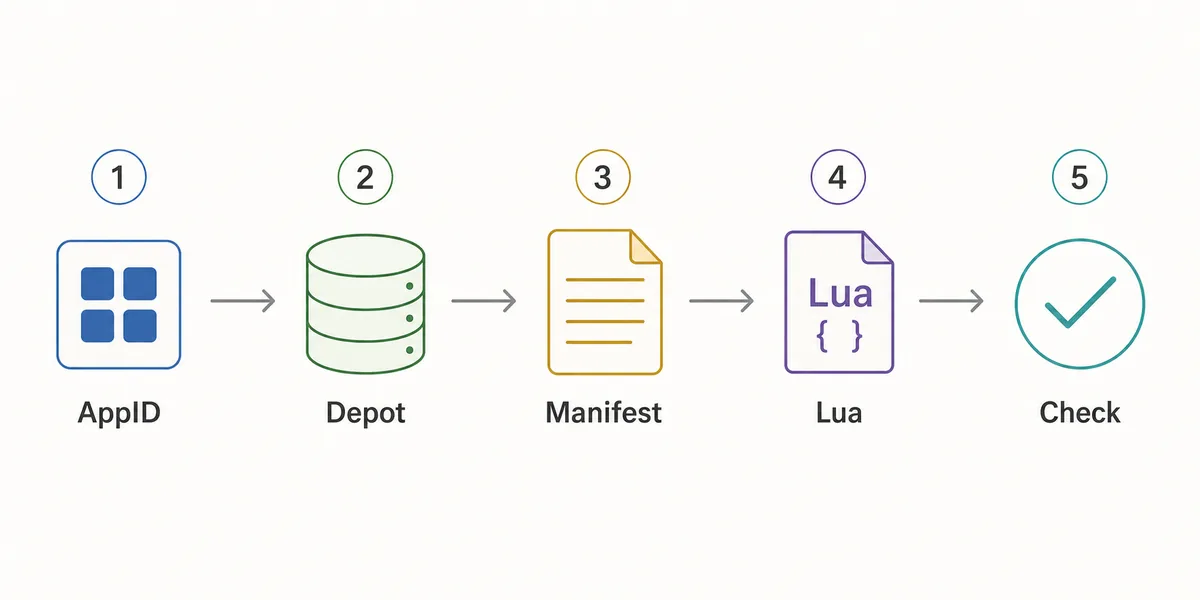
- Confirm the AppID
Use the Steam store URL, SteamDB, or the AppID Finder before you generate anything.
- Check package availability
Use Steam Manifest Finder when you want to know whether a package exists before download.
- Generate the package
Use the main generator when you already know the AppID and need manifest, Lua, JSON, and key files together.
- Inspect the file list
Look for matching AppID references, .manifest files, a .lua file, readable metadata, and expected VDF or key data.
- Refresh after patches
If a game updated recently, stale manifests can fail even when the Lua file looks correct.
Checklist avant import
Utilisez cette checklist avant d'importer un paquet Lua. Elle vise a detecter rapidement les incoherences evidentes, pas a analyser tout le contenu d'un depot Steam.
Si un point echoue, revenez a l'etape precedente : controlez l'AppID, utilisez le finder ou regenerez un paquet apres mise a jour.
| Check | Pass signal | What to do if it fails |
|---|---|---|
| AppID consistency | Folder, metadata, Lua, and package name point to the same AppID | Use AppID Finder or SteamDB to confirm the correct number |
| Manifest presence | One or more .manifest files are included | Regenerate or use the downloader instead of a partial mirror |
| Lua presence | A readable .lua file is included when SteamTools import is the goal | Do not substitute a Lua file from another package |
| Metadata readability | JSON or notes identify game title and depot context | Avoid packages that hide everything behind an installer |
| Update freshness | Package date is newer than the last relevant game patch | Generate a fresh package before changing SteamTools settings |
| No executable wrapper | Files are visible without running a separate program | Do not run unknown executables for small manifest packages |
Quelle page utiliser
Le site contient plusieurs pages car les intentions different. Steam Lua generator demande une explication et un lien vers le generateur; Steam manifest finder verifie l'existence; SteamDB manifest ID explique les identifiants.
Utilisez ce guide pour comprendre le paquet. Utilisez le generateur lorsque vous etes pret a creer ou telecharger les fichiers.
| Need | Best page | Why |
|---|---|---|
| I know the AppID and want the package | Manifest & Lua Generator | Fastest route to the combined manifest and Lua download |
| I want to know whether files exist first | Steam Manifest Finder | Checks availability before download |
| I only know the game name | AppID Finder | Reduces wrong game, DLC, demo, or soundtrack mistakes |
| I need GitHub or repository context | Steam Manifest GitHub Guide | Explains source and mirror checks |
| I need command-line depot download context | DepotDownloader GitHub Guide | Keeps DepotDownloader workflows separate from SteamTools packages |
Intent boundary
A Steam Lua generator guide should educate and route users. The actual package generation belongs on the main tool page.
FAQ
References
- Steamworks Documentation - Applications and depots - Official background on how Steam applications and depots are structured.
- SteamDB technical blog - Steam download system - Technical explanation of Steam depots, manifests, and content delivery.
- PCGamingWiki - Steam - Community technical reference for Steam-related files and troubleshooting.
Derniere mise a jour: July 5, 2026