Steam Lua Generator: como verificar Lua, Manifest e AppID
Um guia pratico para entender o conteudo de um pacote Lua do Steam e como evitar AppID, manifests depot e chaves desencontradas antes do SteamTools.

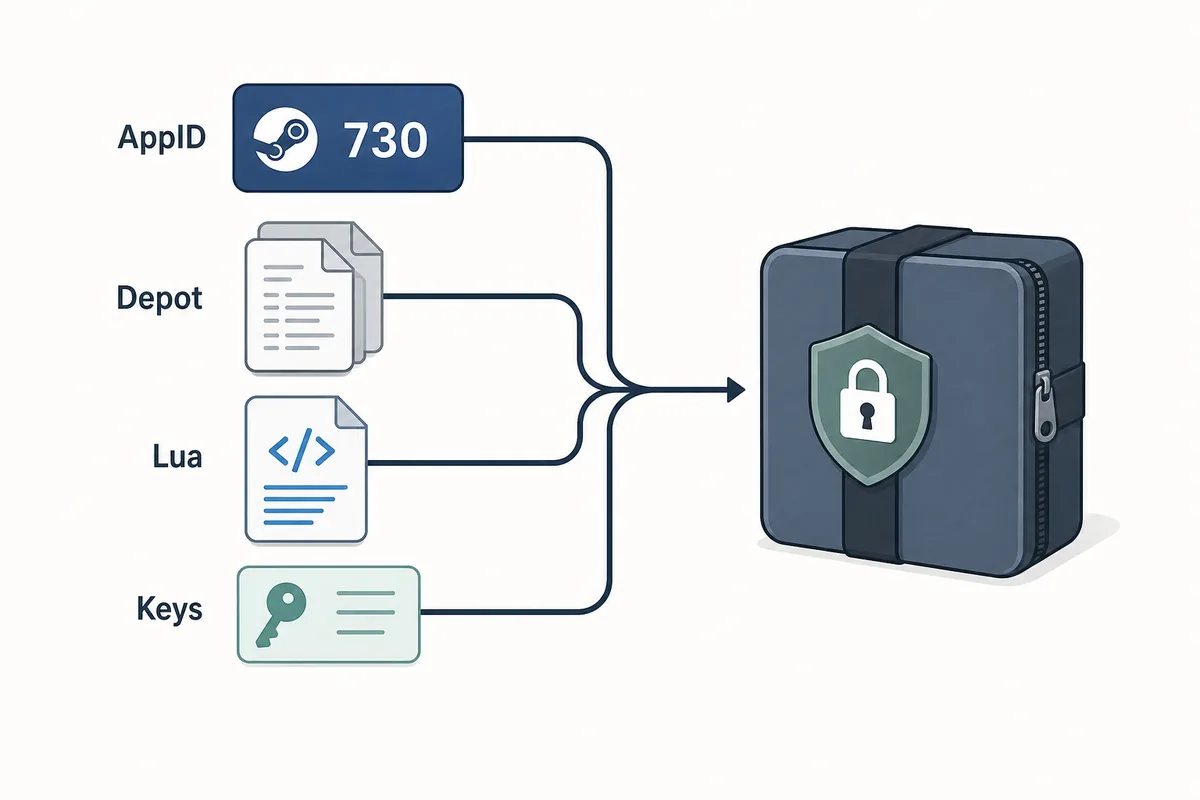
A useful Steam Lua generator keeps the AppID, depot manifest files, Lua script, metadata, and keys in one aligned package.
Indice
Um Steam Lua generator e util quando entrega um script Lua que corresponde ao AppID exato do Steam e aos arquivos manifest que voce pretende usar. O termo e amplo, mas o pacote precisa ser coerente: AppID, manifests depot, metadados JSON, Lua e dados VDF ou chaves devem apontar para o mesmo build.
Se voce so quer baixar arquivos, use o Manifest & Lua Generator principal do site. Esta pagina cobre o antes e o depois: confirmar o AppID correto, verificar se o Lua pertence ao conjunto de manifests e entender por que pacotes antigos falham apos atualizacoes.
O gerador acelera o empacotamento, mas nao substitui a verificacao. Um bom fluxo comeca pelo AppID e termina com uma inspeção rapida antes de importar qualquer coisa no SteamTools.
O que um Steam Lua Generator cria
Um Steam Lua generator deve preparar os pequenos arquivos de texto que um fluxo parecido com SteamTools espera. O arquivo Lua costuma ser a camada de instrucao, enquanto manifests descrevem versoes de depot. Metadados JSON ajudam a conferir titulo, AppID, lista de depots e origem do pacote.
O ponto principal e alinhamento. Um Lua de um AppID nao deve ser misturado com manifests de outra fonte so porque os nomes dos jogos parecem iguais. Steam pode separar demos, DLC, trilhas sonoras, pacotes regionais e builds antigos.
Lua script
Connects the package to the SteamTools import flow and should name the same AppID.
Manifest files
Describe depot build versions and must be fresh enough for the current game state.
JSON metadata
Lets you verify title, AppID, depot list, and package source before import.
VDF and keys
Support package completion when the workflow requires key or VDF data.
Arquivo Lua vs arquivo Manifest
Muitas buscas por Lua manifest generator tratam Lua e manifest como se fossem o mesmo arquivo. Nao sao. O manifest traz dados de versao do depot; o Lua e o arquivo de mapeamento ou instrucao usado pela ferramenta.
Quando um pacote falha, o problema costuma ser desacordo entre arquivos, nao apenas ausencia de um tipo. A tabela ajuda a separar o que verificar.
| File or data | What it does | What to verify |
|---|---|---|
| AppID | Identifies the exact Steam app, edition, demo, or DLC entry | The number matches the store, SteamDB, or your intended package |
| Depot manifest | Points to depot content versions for a build | The depot belongs to the same app and is not stale after an update |
| Lua file | Maps package data for a SteamTools-style import | The AppID inside or near the Lua package matches the manifest set |
| JSON metadata | Summarizes title, depots, and source context | The package description agrees with the files |
| VDF/key data | Provides supporting package data when needed | Missing or mismatched keys are not hidden by a wrapper |
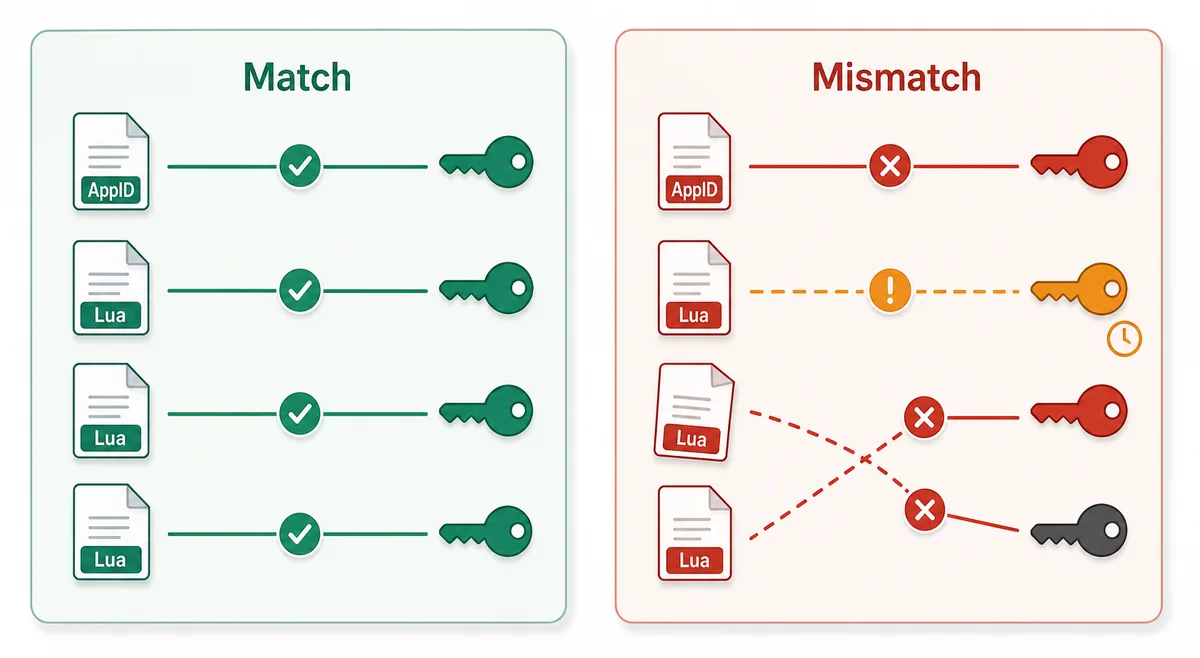
Fluxo seguro: do AppID ao import Lua
Comece pelo AppID, nao por um nome de arquivo achado em forum ou espelho. Depois confirme disponibilidade, gere ou baixe o pacote e inspecione a lista de arquivos.
Um pacote limpo deve ser verificavel sem executar um programa. Como manifests e Lua sao arquivos pequenos, instalador obrigatorio, extensao de navegador, arquivo com senha ou lista oculta sao sinais de risco.
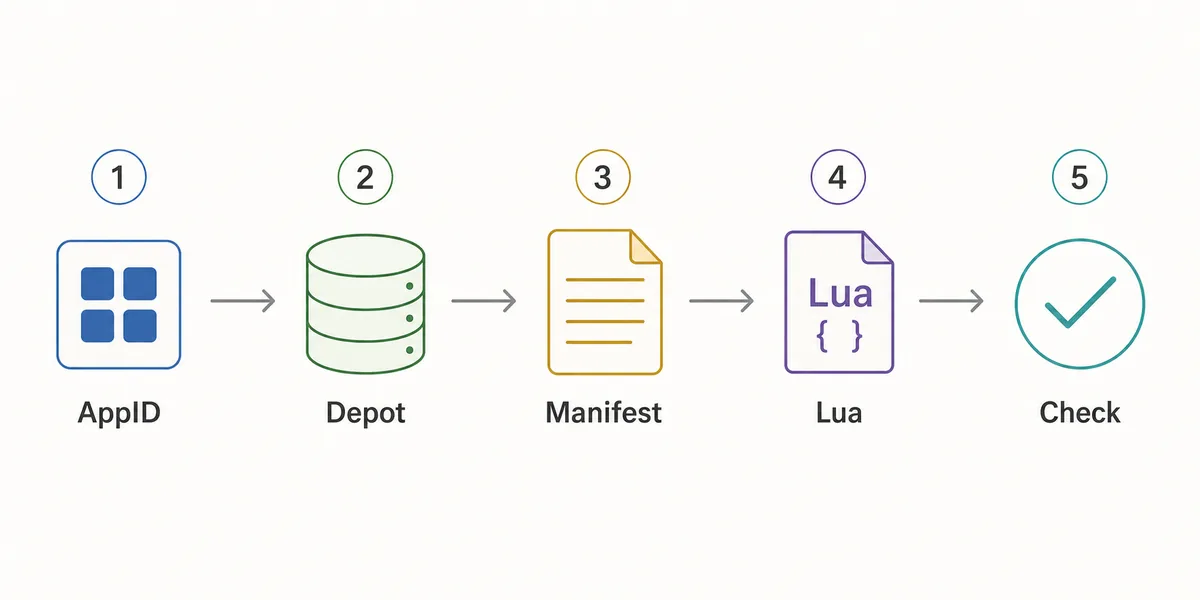
- Confirm the AppID
Use the Steam store URL, SteamDB, or the AppID Finder before you generate anything.
- Check package availability
Use Steam Manifest Finder when you want to know whether a package exists before download.
- Generate the package
Use the main generator when you already know the AppID and need manifest, Lua, JSON, and key files together.
- Inspect the file list
Look for matching AppID references, .manifest files, a .lua file, readable metadata, and expected VDF or key data.
- Refresh after patches
If a game updated recently, stale manifests can fail even when the Lua file looks correct.
Checklist antes de importar
Use esta lista antes de importar um pacote Lua. Ela serve para detectar inconsistencias obvias rapidamente, nao para analisar cada arquivo interno de um depot Steam.
Se algo falhar, volte uma etapa: revise o AppID, use o finder ou gere um pacote novo depois de uma atualizacao recente.
| Check | Pass signal | What to do if it fails |
|---|---|---|
| AppID consistency | Folder, metadata, Lua, and package name point to the same AppID | Use AppID Finder or SteamDB to confirm the correct number |
| Manifest presence | One or more .manifest files are included | Regenerate or use the downloader instead of a partial mirror |
| Lua presence | A readable .lua file is included when SteamTools import is the goal | Do not substitute a Lua file from another package |
| Metadata readability | JSON or notes identify game title and depot context | Avoid packages that hide everything behind an installer |
| Update freshness | Package date is newer than the last relevant game patch | Generate a fresh package before changing SteamTools settings |
| No executable wrapper | Files are visible without running a separate program | Do not run unknown executables for small manifest packages |
Qual pagina usar
O site tem varias paginas porque as intencoes de busca sao diferentes. Steam Lua generator precisa de explicacao e caminho para o gerador principal; Steam manifest finder verifica disponibilidade; SteamDB manifest ID explica identificadores.
Use este guia para entender o pacote. Use o gerador quando estiver pronto para criar ou baixar os arquivos.
| Need | Best page | Why |
|---|---|---|
| I know the AppID and want the package | Manifest & Lua Generator | Fastest route to the combined manifest and Lua download |
| I want to know whether files exist first | Steam Manifest Finder | Checks availability before download |
| I only know the game name | AppID Finder | Reduces wrong game, DLC, demo, or soundtrack mistakes |
| I need GitHub or repository context | Steam Manifest GitHub Guide | Explains source and mirror checks |
| I need command-line depot download context | DepotDownloader GitHub Guide | Keeps DepotDownloader workflows separate from SteamTools packages |
Intent boundary
A Steam Lua generator guide should educate and route users. The actual package generation belongs on the main tool page.
FAQ
Referencias
- Steamworks Documentation - Applications and depots - Official background on how Steam applications and depots are structured.
- SteamDB technical blog - Steam download system - Technical explanation of Steam depots, manifests, and content delivery.
- PCGamingWiki - Steam - Community technical reference for Steam-related files and troubleshooting.
Atualizado em: July 5, 2026