Steam Lua Generator: Lua, Manifest, AppID 확인 방법
Steam Lua 패키지에 무엇이 들어가야 하는지, SteamTools 가져오기 전에 AppID, depot manifest, key 불일치를 피하는 방법을 설명합니다.

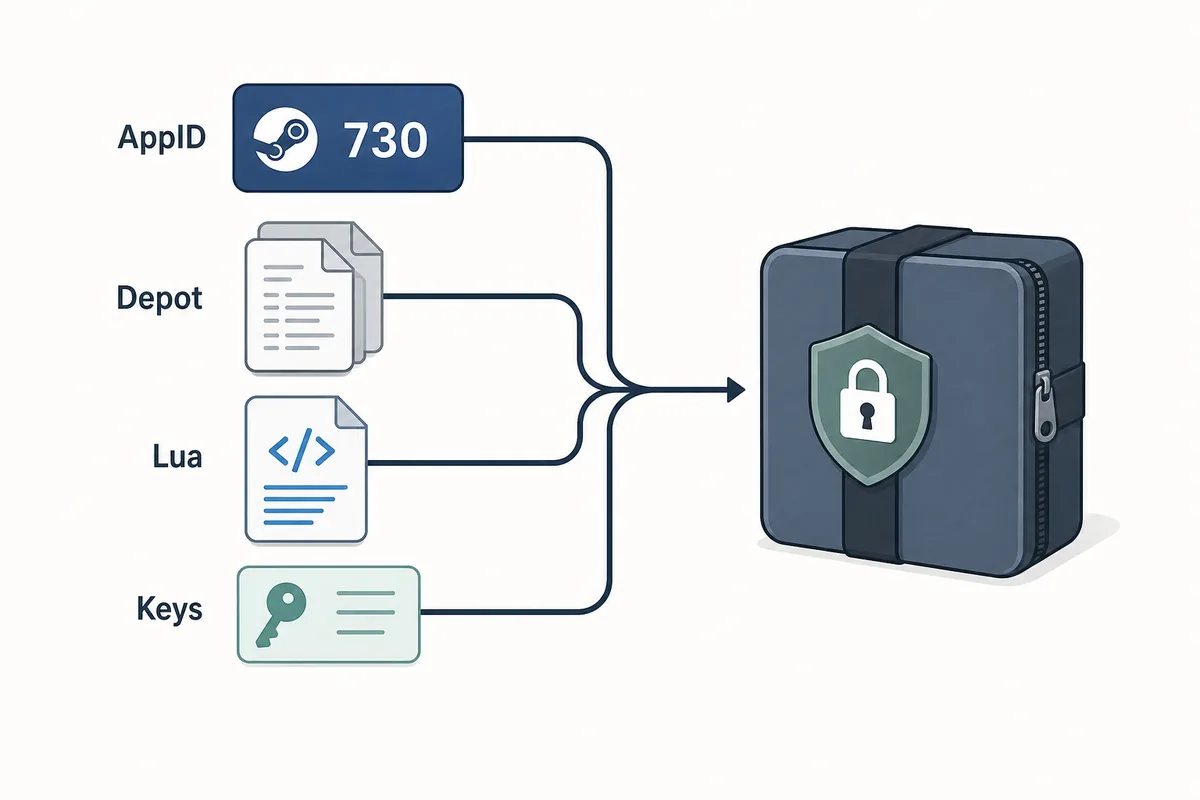
A useful Steam Lua generator keeps the AppID, depot manifest files, Lua script, metadata, and keys in one aligned package.
목차
Steam Lua generator는 사용하려는 정확한 Steam AppID와 manifest 파일에 맞는 Lua 스크립트를 제공할 때 유용합니다. 이 표현은 넓게 쓰이지만 패키지는 느슨하면 안 됩니다. AppID, depot manifest, JSON metadata, Lua, VDF 또는 key 데이터가 같은 빌드를 가리켜야 합니다.
파일만 내려받으려면 이 사이트의 기본 Manifest & Lua Generator를 사용하세요. 이 페이지는 그 전후 단계, 즉 올바른 AppID인지, Lua가 manifest 세트와 맞는지, 오래된 패키지가 업데이트 후 실패하는 이유를 확인하는 가이드입니다.
생성기는 패키징을 빠르게 해 주지만 안전 확인 자체는 아닙니다. 좋은 흐름은 AppID 확인으로 시작하고 SteamTools에 넣기 전 파일 목록 점검으로 끝납니다.
Steam Lua Generator가 만드는 것
Steam Lua generator는 SteamTools 형태의 흐름에서 필요한 작은 텍스트 기반 파일을 준비해야 합니다. Lua 파일은 보통 지시나 매핑 역할을 하고, manifest 파일은 depot 버전을 설명합니다. JSON metadata는 게임 제목, AppID, depot 목록, 패키지 출처를 확인하는 데 도움이 됩니다.
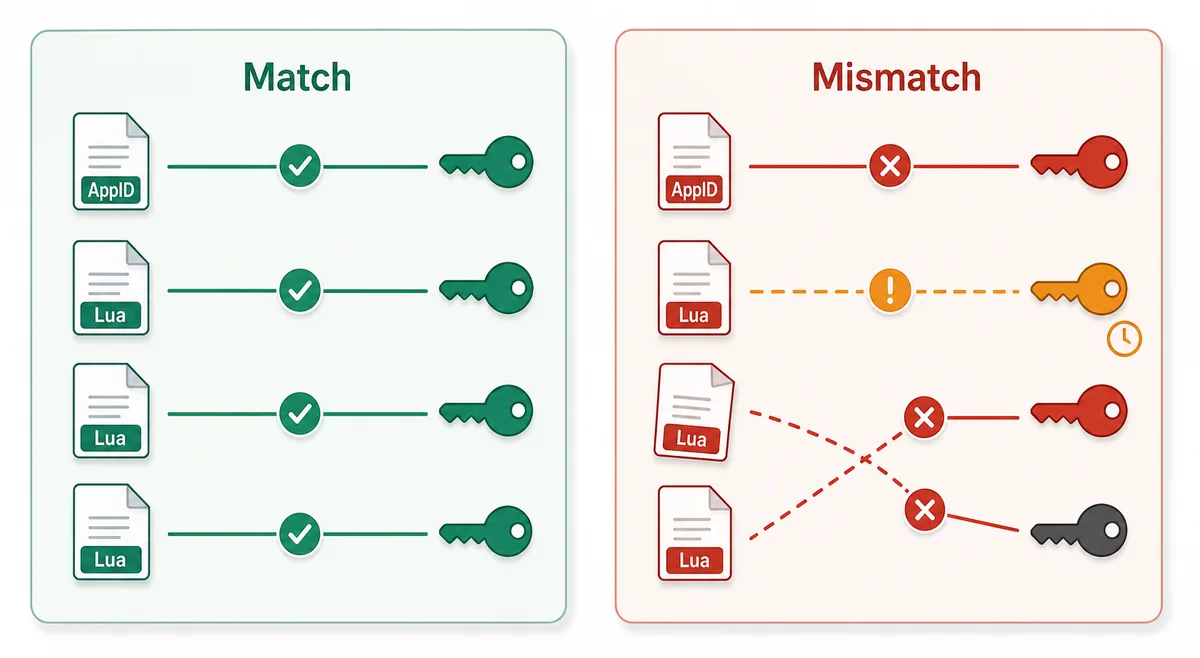
핵심은 정합성입니다. 게임 이름이 비슷하다고 해서 한 AppID의 Lua와 다른 출처의 manifest를 섞으면 안 됩니다. Steam에는 demo, DLC, soundtrack, 지역 패키지, 오래된 build가 따로 있을 수 있습니다.
Lua script
Connects the package to the SteamTools import flow and should name the same AppID.
Manifest files
Describe depot build versions and must be fresh enough for the current game state.
JSON metadata
Lets you verify title, AppID, depot list, and package source before import.
VDF and keys
Support package completion when the workflow requires key or VDF data.
Lua 파일과 Manifest 파일 차이
Lua manifest generator라고 검색하면 Lua와 manifest가 같은 파일처럼 보일 수 있지만 역할은 다릅니다. Manifest는 depot 버전 데이터이고 Lua는 대상 도구가 읽는 매핑 또는 지시 파일입니다.
패키지가 실패할 때는 한 파일이 없어서가 아니라 파일들이 같은 AppID나 build를 가리키지 않는 경우가 많습니다. 아래 표는 확인 대상을 분리해 줍니다.
| File or data | What it does | What to verify |
|---|---|---|
| AppID | Identifies the exact Steam app, edition, demo, or DLC entry | The number matches the store, SteamDB, or your intended package |
| Depot manifest | Points to depot content versions for a build | The depot belongs to the same app and is not stale after an update |
| Lua file | Maps package data for a SteamTools-style import | The AppID inside or near the Lua package matches the manifest set |
| JSON metadata | Summarizes title, depots, and source context | The package description agrees with the files |
| VDF/key data | Provides supporting package data when needed | Missing or mismatched keys are not hidden by a wrapper |
안전한 흐름: AppID에서 Lua 가져오기까지
포럼이나 미러의 파일명부터 시작하지 말고 AppID부터 확인하세요. 그다음 패키지 존재 여부를 확인하고, 생성 또는 다운로드한 뒤 파일 목록을 점검합니다.
정상적인 패키지는 실행 파일 없이도 내용을 확인할 수 있어야 합니다. Manifest와 Lua는 보통 작은 파일이므로 강제 설치기, 브라우저 확장, 비밀번호 압축, 숨겨진 파일 목록은 위험 신호입니다.
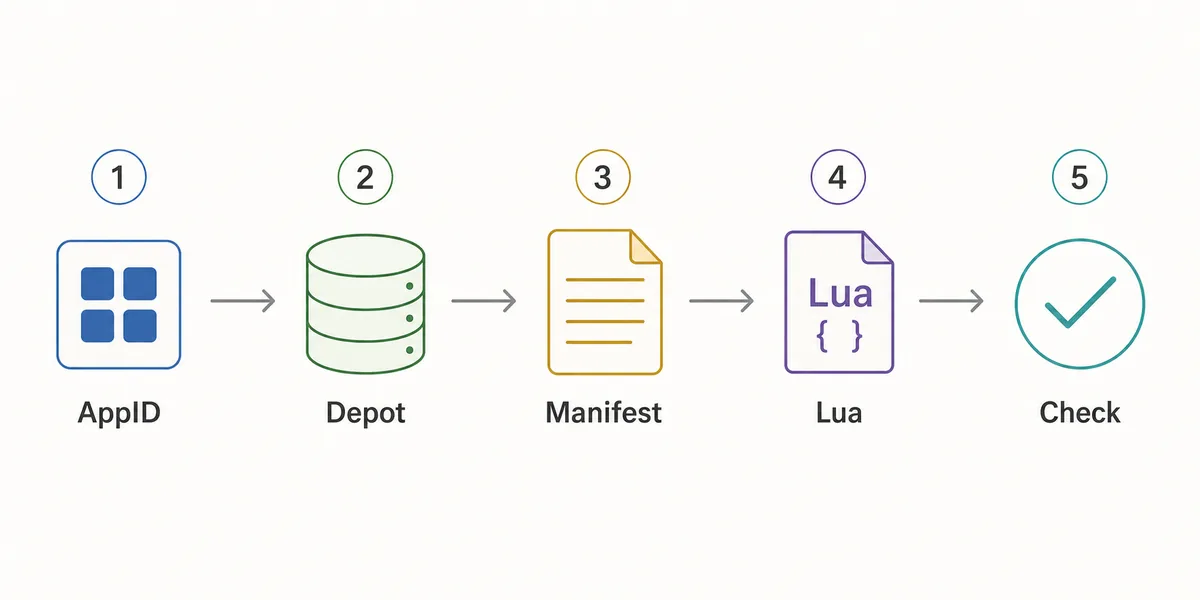
- Confirm the AppID
Use the Steam store URL, SteamDB, or the AppID Finder before you generate anything.
- Check package availability
Use Steam Manifest Finder when you want to know whether a package exists before download.
- Generate the package
Use the main generator when you already know the AppID and need manifest, Lua, JSON, and key files together.
- Inspect the file list
Look for matching AppID references, .manifest files, a .lua file, readable metadata, and expected VDF or key data.
- Refresh after patches
If a game updated recently, stale manifests can fail even when the Lua file looks correct.
가져오기 전 확인 체크리스트
Lua 패키지를 가져오기 전에 이 체크리스트를 사용하세요. 목적은 Steam depot의 모든 파일을 분석하는 것이 아니라 명백한 불일치를 빨리 찾는 것입니다.
하나라도 실패하면 한 단계 뒤로 돌아가 AppID를 다시 확인하고, finder로 존재 여부를 보거나, 최근 업데이트 이후 새 패키지를 생성하세요.
| Check | Pass signal | What to do if it fails |
|---|---|---|
| AppID consistency | Folder, metadata, Lua, and package name point to the same AppID | Use AppID Finder or SteamDB to confirm the correct number |
| Manifest presence | One or more .manifest files are included | Regenerate or use the downloader instead of a partial mirror |
| Lua presence | A readable .lua file is included when SteamTools import is the goal | Do not substitute a Lua file from another package |
| Metadata readability | JSON or notes identify game title and depot context | Avoid packages that hide everything behind an installer |
| Update freshness | Package date is newer than the last relevant game patch | Generate a fresh package before changing SteamTools settings |
| No executable wrapper | Files are visible without running a separate program | Do not run unknown executables for small manifest packages |
어떤 페이지를 써야 할까
이 사이트에 여러 페이지가 있는 이유는 검색 의도가 다르기 때문입니다. Steam Lua generator는 설명과 기본 생성기로 가는 경로가 필요하고, Steam manifest finder는 존재 확인이 중심이며, SteamDB manifest ID는 식별자 이해가 중심입니다.
패키지를 이해하려면 이 가이드를 사용하고, 실제 파일을 만들거나 내려받을 때는 기본 Manifest & Lua Generator를 사용하세요.
| Need | Best page | Why |
|---|---|---|
| I know the AppID and want the package | Manifest & Lua Generator | Fastest route to the combined manifest and Lua download |
| I want to know whether files exist first | Steam Manifest Finder | Checks availability before download |
| I only know the game name | AppID Finder | Reduces wrong game, DLC, demo, or soundtrack mistakes |
| I need GitHub or repository context | Steam Manifest GitHub Guide | Explains source and mirror checks |
| I need command-line depot download context | DepotDownloader GitHub Guide | Keeps DepotDownloader workflows separate from SteamTools packages |
Intent boundary
A Steam Lua generator guide should educate and route users. The actual package generation belongs on the main tool page.
FAQ
참고 자료
- Steamworks Documentation - Applications and depots - Official background on how Steam applications and depots are structured.
- SteamDB technical blog - Steam download system - Technical explanation of Steam depots, manifests, and content delivery.
- PCGamingWiki - Steam - Community technical reference for Steam-related files and troubleshooting.
마지막 업데이트: July 5, 2026