Steam Manifest en GitHub: como encontrar archivos correctos sin descargas riesgosas
Guia practica para quienes buscan en GitHub manifests de Steam, scripts Lua, AppID, datos appmanifest y paquetes listos para SteamTools.

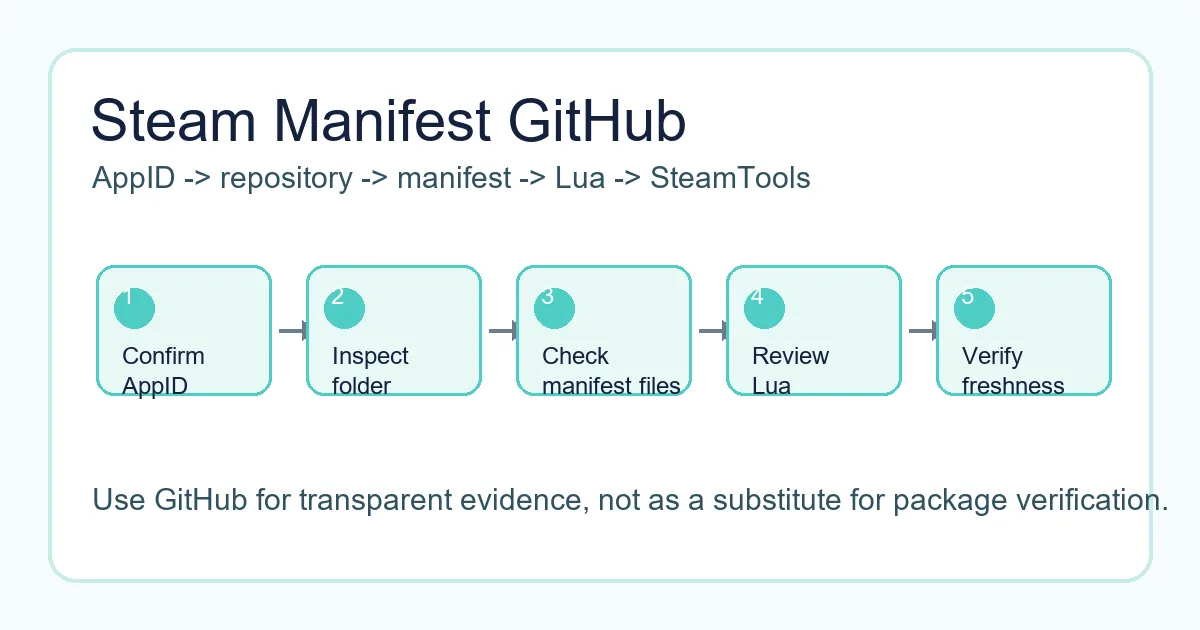
Un flujo seguro revisa carpeta AppID, manifest, Lua, metadatos y fecha de actualizacion antes de importar en SteamTools.
Indice
If you search for "steam manifest github", you are probably trying to find a repository that contains Steam manifest files, Lua scripts, AppIDs, depot data, or a package that can be used with SteamTools. GitHub often appears in those searches because repositories are easy to browse, easy to update, and easier to inspect than anonymous download mirrors.
That transparency is helpful, but it does not make every repository safe or current. A repository can be outdated, incomplete, copied from another source, or mixed with files that do not belong to the AppID you need. The page title may mention Steam manifest while the folder contains only partial metadata or stale Lua files.
This guide explains how Steam manifest GitHub repositories are usually organized, what a complete package should include, how appmanifest files differ from depot manifests, and when it is faster to use a manifest finder instead of browsing GitHub manually.
Why GitHub Shows Up for Steam Manifest Searches
GitHub aparece para esta busqueda porque muchos proyectos comunitarios publican carpetas de manifests, herramientas de busqueda, scripts para SteamTools y documentacion. La ventaja es que puedes ver nombres de archivo, historial de cambios y estructura antes de descargar.
El riesgo es que los resultados mezclan paquetes reales, codigo fuente, discusiones y forks antiguos. Usa GitHub para inspeccionar evidencia, no como garantia de que los archivos sean correctos.
Un repositorio util deja claros AppID, depot IDs, manifests, Lua, fecha y proposito del paquete. Si no puedes saber a que juego pertenece, no lo importes.
Visible file history
Commit dates can help you judge whether a package was touched after a recent game update.
Browsable folders
A clear AppID folder is easier to verify than a password-protected archive or forced installer.
Lua and metadata
Lua, JSON, VDF, and manifest files should describe the same app rather than unrelated packages.
Forks can be stale
A fork may look legitimate but stop receiving updates long before the original source changes.
What a Steam Manifest GitHub Repository Usually Contains
Los repositorios utiles suelen organizarse por AppID o por paquete de juego. Dentro puede haber manifests de depot, Lua, JSON, VDF o claves, notas README y a veces archivos ZIP de release.
Steam usa depots y manifests para entregar contenido. Los repositorios comunitarios solo agrupan archivos pequenos y scripts esperados por SteamTools.
La tabla separa tipos de archivo comunes para revisar una carpeta rapidamente.
| File or folder | What it usually means | What to verify |
|---|---|---|
| AppID folder | A folder named with the Steam app number | Confirm it matches the Steam store page or SteamDB entry |
| .manifest files | Depot manifest data for one or more depots | Check that the depot IDs make sense for the game or edition |
| .lua file | SteamTools handoff script | Open it as text and confirm it references the same AppID |
| JSON metadata | Package, depot, or source information | Look for readable title, AppID, depot list, and source date |
| VDF or key files | Supporting configuration used by some workflows | Make sure the file belongs to the same app package |
| Release ZIP | Convenience archive of the files | Prefer archives that mirror the visible repository contents |
The Safe Checklist Before Downloading from GitHub
Antes de descargar un ZIP o copiar archivos, haz una verificacion corta. Evita mirrors que reutilizan nombres de repositorio pero cambian los archivos.
Comprueba identidad, frescura y alcance. AppID, titulo, Lua y carpeta de manifests deben coincidir; los manifests viejos pueden fallar tras un parche; un paquete pequeno no deberia exigir ejecutables.
-
Confirm the AppID outside the repository
Use the Steam store URL, SteamDB, or the AppID Finder on this site. Do not rely only on a GitHub folder name.
-
Inspect the file list before downloading
A transparent package should show manifest, Lua, JSON, and optional VDF or key files without hiding them behind an installer.
-
Check update timing
Compare repository commit dates or release dates with the game patch window. Old packages can import but fail later.
-
Avoid executable wrappers
Manifest and Lua files are small. A forced .exe, browser extension, or password archive is a separate software trust decision.
-
Use same-language pages when possible
If you move from this guide to a finder or AppID page, use the localized route so instructions and anchors stay consistent.
Practical rule
GitHub is safest when it stays transparent. If you cannot inspect the package before running something, choose a browser-based lookup path instead.
Appmanifest Files vs Steam Depot Manifest Files
La palabra manifest es confusa porque se usa para cosas distintas. Un appmanifest es el registro local de biblioteca de Steam, como appmanifest_730.acf. Un depot manifest describe datos de version de contenido.
Si buscas appmanifest Steam GitHub, puede que necesites ejemplos o explicacion, no un paquete listo. Un appmanifest no reemplaza manifests de depot ni Lua.
Esta diferencia evita descargar el recurso incorrecto.
| Term | Common file example | Use case |
|---|---|---|
| Appmanifest / ACF | appmanifest_1091500.acf | Local Steam library metadata for an installed app |
| Depot manifest | .manifest files in a package folder | Describes depot content versions used by Steam delivery |
| Lua script | 1091500.lua or similar | Maps the package for a SteamTools workflow |
| JSON metadata | app.json, depots.json, package.json | Documents title, AppID, depots, and source context |
A Better Workflow Than Searching Random GitHub Forks
Navegar GitHub manualmente sirve cuando necesitas transparencia o revisar un repositorio concreto. No es lo mas rapido si solo quieres saber si existe un paquete para un AppID.
En este sitio, Steam Manifest Finder comprueba disponibilidad por AppID y AppID Finder ayuda si solo conoces el nombre del juego.
Usa esta pagina como capa de seguridad para decidir que confiar, que evitar y que herramienta usar despues.
| Your situation | Best next page | Why |
|---|---|---|
| You know the AppID and need availability | Steam Manifest Finder | Checks package availability without manual repository browsing |
| You know the game name only | AppID Finder | Reduces demo, DLC, soundtrack, and edition mistakes |
| You want repository safety context | Steam Manifest Hub Guide | Explains hubs, mirrors, and source trust checks |
| You need a full package checklist | SteamTools Manifest Generator Guide | Covers Lua, manifest, JSON, VDF, and import checks |
FAQ
Sobre la autora
Sophie Laurent
Redactora tecnica y entusiasta de PC gaming
Sophie Laurent escribe guias practicas sobre gestion de archivos de Steam, AppIDs, manifests y flujos de SteamTools. Su trabajo convierte terminos dispersos de repositorios en comprobaciones claras para usuarios de PC.
Referencias y lecturas recomendadas
- Steamworks Documentation - Applications and depots - Official background on Steam application and depot structure.
- SteamDB technical blog - Steam download system - Technical explanation of depots, manifests, and Steam content delivery.
- GitHub Docs - About repositories - Primary documentation for repository structure, files, and history.
Ultima actualizacion: 4 de junio de 2026