DepotDownloader GitHub: 9 Checks vor dem Download eines Steam-Depots
Eine praktische Anleitung zum Open-Source-Workflow mit AppID, DepotID, ManifestID, Branch-Zugriff, Kontosicherheit und dem Unterschied zu SteamTools-Manifestpaketen.

DepotDownloader lässt sich am besten prüfen, wenn du ihn als ID- und Berechtigungsworkflow behandelst, nicht nur als kopierten Befehl. Bestätige App, Depot, Manifestversion, Branch und Zielordner vor Login oder Download.
Inhaltsverzeichnis
Nutze DepotDownloader, wenn du einen Steam-Depot-Download genau steuern musst: bestimmtes Depot, Manifestversion, Branch, Zielordner oder reproduzierbarer Befehl.
Nutze ihn nicht als Ersatz für Berechtigungsprüfungen. Ohne Besitz, Branch-Zugriff oder Depot-Schlüssel hilft keine andere Syntax.
DepotDownloader ist ein eigenständiges Kommandozeilenwerkzeug zum Laden von Steam-Depot-Inhalten. GitHub ist der beste Startpunkt für README, Releases, Verlauf und Issues.
Kurzantwort: Wann DepotDownloader sinnvoll ist
Nutze DepotDownloader, wenn du einen Steam-Depot-Download genau steuern musst: bestimmtes Depot, Manifestversion, Branch, Zielordner oder reproduzierbarer Befehl.
Nutze ihn nicht als Ersatz für Berechtigungsprüfungen. Ohne Besitz, Branch-Zugriff oder Depot-Schlüssel hilft keine andere Syntax.
| Need | Best fit | Why |
|---|---|---|
| I need a SteamTools Lua package | Manifest & Lua Generator | It bundles manifest, Lua, JSON, and key files for a SteamTools-style workflow. |
| I need to check package availability | Steam Manifest Finder | It answers whether this site has a package for an AppID before you download. |
| I need one depot or old depot version | DepotDownloader | It lets you target AppID, DepotID, ManifestID, branch, and output folder explicitly. |
| I only know the game name | AppID Finder | It reduces wrong edition, demo, soundtrack, and DLC AppID mistakes. |
Was DepotDownloader ist und was nicht
DepotDownloader ist ein eigenständiges Kommandozeilenwerkzeug zum Laden von Steam-Depot-Inhalten. GitHub ist der beste Startpunkt für README, Releases, Verlauf und Issues.
Es ist keine offizielle Steam-Seite, kein SteamTools-Paketgenerator und kein Weg um Konto- oder Branch-Beschränkungen.
Open project
Use the repository and release notes as the primary source for syntax, binaries, and changes.
Command-line tool
You plan options before running the command, including app, depot, manifest, branch, and folder.
Permission-bound
Ownership, branch passwords, and encrypted depots still matter.
Depot output
The output is depot files, not automatically a complete SteamTools Lua package.
Kurzantwort
If your goal is one controlled depot download, DepotDownloader may fit. If your goal is a ready SteamTools package, use the generator or finder first.
GitHub-Checks vor dem Download
Starte beim Originalprojekt oder einem vertrauenswürdigen Release-Link. Lade kein Archiv nur wegen des Namens DepotDownloader.
Vergleiche das Release-Datum mit deinem Problem. Alte Beispiele lassen oft Branch-, Manifest- oder Ordneroptionen aus.
| Check | What to inspect | Why it matters |
|---|---|---|
| Repository source | Project owner, README, releases, and issue history | Avoids repackaged or renamed downloads. |
| Release freshness | Latest release date and recent commits | Old binaries may not match current Steam behavior. |
| Binary source | Release asset from the project, not an ad mirror | Reduces wrapper and malware risk. |
| Command examples | README syntax before blog/forum snippets | Examples online often omit branch or manifest options. |
| No forced installer | Avoid password archives, browser extensions, and unrelated EXE wrappers | Depot tools should not require unrelated software layers. |
IDs vor dem Befehl planen
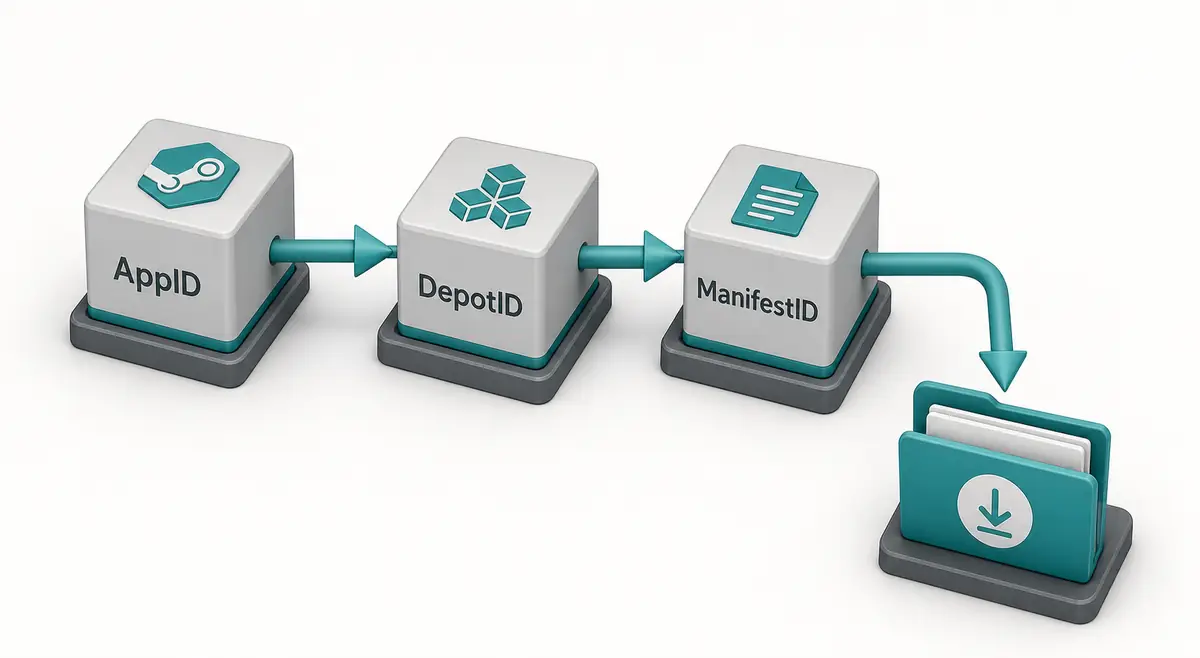
Der Befehl ist nur so gut wie seine IDs. AppID steht für die App, DepotID für die Inhaltsgruppe, ManifestID für eine Version dieses Depots.
Notiere Titel, AppID, Depot, DepotID, ManifestID, Branch und Zielordner vor dem Start.
-
Confirm the AppID from the store URL, SteamDB, or the AppID Finder.
Do not guess from a game title because demos, DLC, test apps, and soundtracks can have separate AppIDs.
-
Choose the DepotID that matches your target files.
A Windows depot, language depot, DLC depot, or shared asset depot may contain only part of the game.
-
Use ManifestID only when you need a specific version.
For current files, a manifest parameter may be unnecessary. For an older build, the ManifestID must belong to that selected depot.
-
Set a separate output directory.
Never point a first test download straight at your live Steam library.
-
Keep the command and notes together.
Save the IDs and command in a text file so you can audit what happened later.
Konto-, Branch- und Ordnersicherheit
DepotDownloader kann je nach Depot einen Login verlangen. Folge der Projektdokumentation und meide Wrapper mit Credential-Abfragen.
Lade zuerst in einen sauberen Ordner außerhalb der aktiven Steam-Bibliothek und vergleiche danach.

| Risk | Typical cause | Safer habit |
|---|---|---|
| Login confusion | A copied command does not explain account requirements | Read the current README and avoid credential prompts from mirrors. |
| Branch rejection | The depot belongs to a beta or private branch | Confirm branch name, password requirements, and ownership first. |
| Encrypted content | Depot needs keys not available to the account | Do not assume every depot is downloadable just because a manifest ID exists. |
| Broken install | Files are downloaded into the active game folder | Use a separate folder and compare before replacing anything. |
| Incomplete game | Only one depot was downloaded | Review language, DLC, platform, and shared depots before expecting a full install. |
DepotDownloader vs. SteamTools-Pakete
DepotDownloader liefert meist heruntergeladene Depot-Dateien. Ein SteamTools-Paket enthält andere Bausteine: Manifest, Lua, JSON und teils VDF oder Schlüssel.
DepotDownloader-GitHub-Suchen zielen auf Tool, Syntax und Releases; Manifest-and-Lua-Suchen auf ein fertiges Paket.
| Workflow | Output | Use when |
|---|---|---|
| DepotDownloader | Downloaded depot content in a folder | You need one depot, one manifest version, a branch-aware download, or repeatable CLI logs. |
| Steam console download_depot | Depot content from the Steam client | You need a quick manual download and understand the IDs. |
| Manifest & Lua Generator | ZIP package with manifest, Lua, JSON, and related files | You already know the AppID and want a SteamTools-style package. |
| Steam Manifest Finder | Availability check by AppID | You want to know whether a package exists before downloading. |
| SteamDB Manifest ID Guide | ID explanation and verification steps | You are still sorting out AppID, DepotID, ManifestID, or build history. |
Fehlerbehebung: typische Ursachen
Fehler entstehen meist durch fehlenden Zugriff, falsches Depot, unpassende ManifestID oder veraltete Beispiele.
Wenn der Download klappt, aber unvollständig wirkt, kann das normal sein: viele Spiele haben mehrere Depots.
| Symptom | Likely cause | First check |
|---|---|---|
| Manifest is rejected | ManifestID does not match the selected DepotID | Return to the depot history and copy the matching version. |
| Login or access error | Ownership, branch, or encrypted depot rules block access | Confirm account access and branch requirements. |
| Only some files download | You targeted one depot from a multi-depot app | Review platform, language, DLC, and shared depots. |
| Command example fails | Syntax changed or example omitted required options | Check the current GitHub README and release notes. |
| SteamTools import still fails | Downloaded content is not a Lua manifest package | Use the Manifest & Lua Generator or verify package files separately. |
Expertenhinweis
Check ID match first, account and branch access second, syntax third, and destination folder last. Random command swapping usually hides the real mismatch.
FAQ
References
- DepotDownloader on GitHub - Primary project page for releases, documentation, and issue history.
- SteamDB - Useful for checking AppID, depot, branch, build, and manifest context before planning a command.
- Steamworks Depots documentation - Official Valve documentation explaining how Steam depots are organized for applications.
Zuletzt aktualisiert: July 1, 2026